WhatsApp appointments: a practical guide to cutting no-shows
5 October 2026
Yes: handling appointments on WhatsApp cuts no-shows when it comes with just-in-time reminders, sent about 24 hours before the appointment. The default operating rule is simple: a single reminder at that interval, without overwhelming the customer with several messages. If the service is high-value or has a history of no-shows, it is worth adding a deposit or advance payment to secure the booking.
In short:
- Sending a single reminder on WhatsApp 24 hours before cuts no-shows almost as much as a double reminder and leads to fewer cancellations by the patient.
- Integrating with calendar and payment systems lets you automate confirmations, rescheduling and payments, making appointment management smoother and reducing errors.
- Personalising messages, with specific details and direct links, reduces customer confusion and speeds up their reply.
- It is a good idea to automate the release of unanswered slots so you can offer them to your waiting list and recover potential revenue quickly.
- Over-automating messages can put people off and lead to restrictions on your account, so it is best to combine automation with human oversight.
Contents
- Why use WhatsApp to manage appointments
- Timing and frequency: what the evidence says and how to apply it
- Putting it into practice: tool, calendar and sending settings
- Message templates and examples for each stage
- How to handle non-replies, cancellations and freed-up slots
- Good practice and common mistakes when automating appointments
- How we handle it at Vural
- Frequently asked questions
- Sources
Why use WhatsApp to manage appointments
WhatsApp works as a reminder channel because messages are read almost immediately, unlike an email that can sit unopened for days. For a business with a fully booked diary (hair salon, physiotherapy centre, beauty centre), that speed translates directly into fewer empty chairs.
Beyond the read rate, there are clear advantages in the day-to-day running of reception:
- The customer can confirm, cancel or ask to change the time with a single message, without phoning or waiting on hold.
- Reception staff no longer waste time ringing people one by one to confirm the next day's diary.
- A slot freed up in time can be offered to another customer on the waiting list instead of going empty.
- The same channel lets you take a deposit or keep the customer's history without switching apps.
That combination (speed, two-way conversation and the option to automate) explains why more and more service businesses are moving their reminders from SMS or email to WhatsApp.
Timing and frequency: what the evidence says and how to apply it
The question that raises the most doubts is not whether to send reminders, but how many and when. A target trial emulation on WhatsApp reminders, carried out in the public health system of Buenos Aires (Argentina), analysed 475,214 appointments and compared a single reminder sent 24 hours before with a double-reminder schedule.
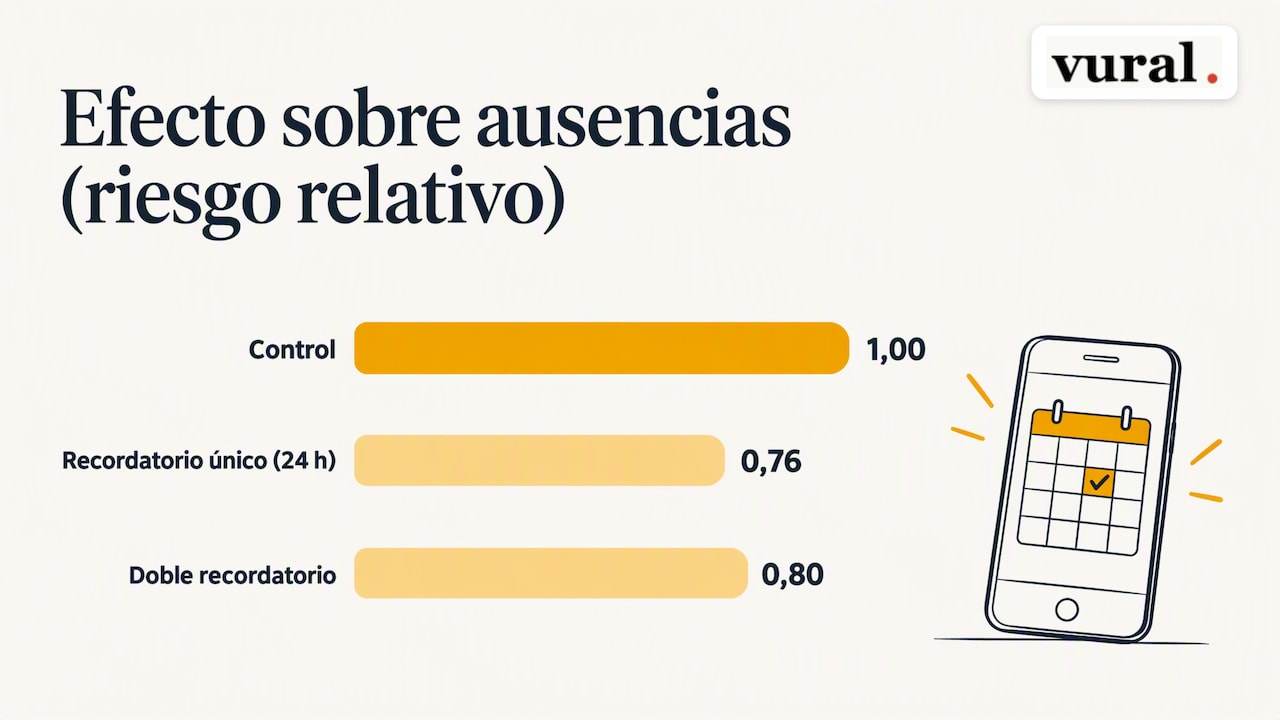
The single 24-hour reminder reduced no-shows about as much as the double reminder (target trial emulation), with a relative risk of 0.76 against the control group, very close to the 0.80 of the double schedule. The important difference lies in the side effect: the double reminder led to more cancellations initiated by the patients themselves.
That second finding changes the decision depending on your operating context:
- If your priority is simply that the person turns up, a single reminder 24 hours before is enough and keeps messaging friction down.
- If you have an active waiting list and room to reallocate slots in advance, a second, earlier reminder can help you spot cancellations in time to fill the slot.
- If your ability to reallocate is limited, avoid the double reminder: every cancellation it triggers is a slot you probably won't fill in time.
Putting it into practice: tool, calendar and sending settings
Before writing the first message, decide the scope of the system: just automatic reminders, or an assistant that also books and changes appointments without human intervention? The answer shapes the rest of the setup.
- Define the scope: a simple reminder bot covers the basics; a conversational agent that replies, books and changes appointments at any hour adds real value when the volume of messages is high.
- Connect the calendar: integrating with Google Calendar or another diary system stops every booking being recorded twice and cuts double-booking errors.
- Add payments and deposits: if the service calls for it, link a payment system so that the confirmation includes paying a deposit when the risk of a no-show justifies it.
- Set the sending parameters: message template, 24-hour interval, reconfirmation window and a direct link to cancel or reschedule without having to write a new message.
- Check the official channel: use the WhatsApp Business API or a provider with a certified integration, and ask for the customer's explicit consent before including them in automated messages.
The same logic (official channel, clear instructions and an alternative contact option) is followed by public guides to booking appointments on WhatsApp published by health authorities in Argentina, which already use this channel to manage appointments and explain to patients how to request them free of charge.
Message templates and examples for each stage
An immediate confirmation message, sent straight after booking, reduces doubts and avoids unnecessary calls. Include the date, time, service and a link to manage the appointment. The 24-hour reminder should always offer three clear options.
- Confirmation after booking: customer's name, service, date, time and a link to change the appointment.
- 24-hour reminder: “We look forward to seeing you tomorrow at [time] for [service]. Reply CONFIRM, CANCEL or ask for another time.”
- Waiting-list offer: “A slot has opened up for [service] on [date] at [time]. Reply YES to book it.”
- Minimum personalisation: name, specific service, estimated duration and any preparation instructions the service requires.
The more specific the message (the exact service, not a generic “your appointment”), the less confusion there is and the faster the customer replies.
How to handle non-replies, cancellations and freed-up slots
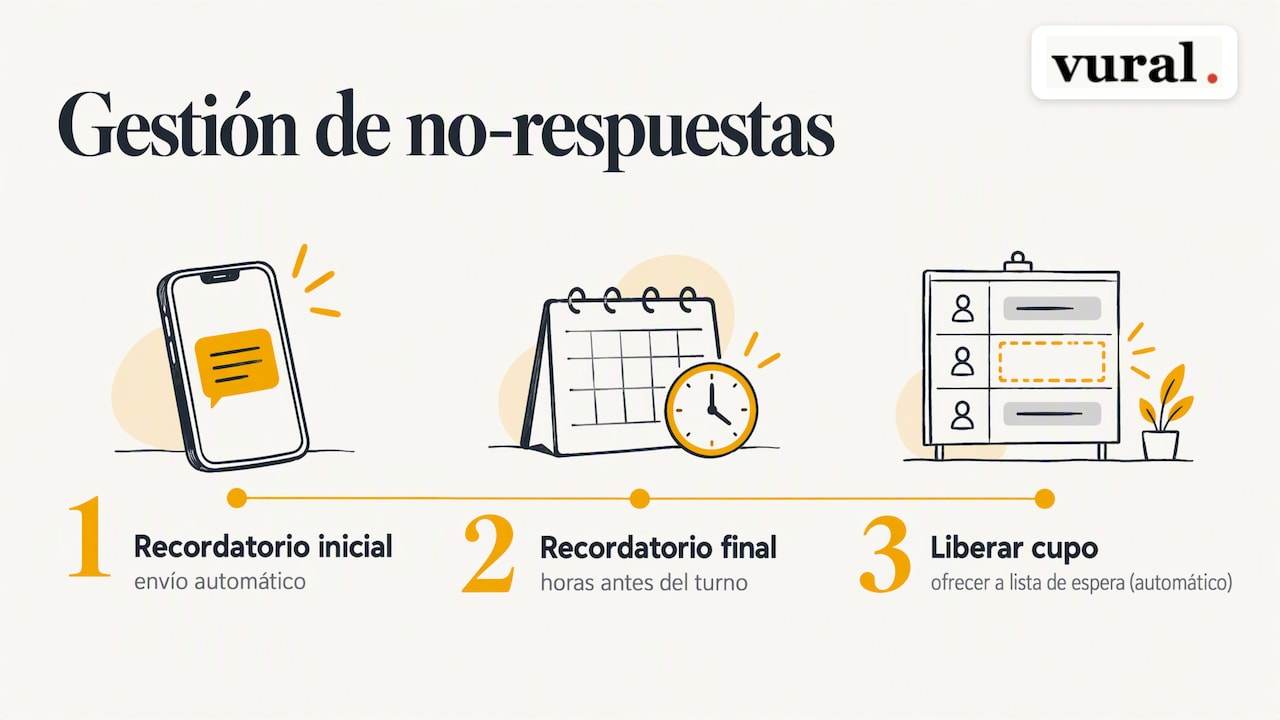
When the customer doesn't reply to the reminder, follow a simple escalation: an initial automatic attempt, a final reminder a few hours before and, if there is still no reply, release the slot to offer it to the waiting list. Automating that last step is what really recovers revenue, because the slot is offered to another customer within minutes, not the next day when it is too late.
Whether to ask for a deposit or advance payment depends on the risk and the value of the service: for short, low-cost appointments it rarely pays off, but for long or high-value treatments it noticeably reduces the risk of losing money to a no-show.
Good practice and common mistakes when automating appointments
The most common mistake is over-automating: sending several messages to a customer who has already confirmed clutters the conversation and puts them off. On top of that, excessive automated messaging harms the experience and can lead to restrictions on the business account.
To keep the system effective without losing the personal touch:
- Review your confirmation and no-show rates regularly so you can adjust the interval if needed.
- Personalise the essentials (name, service, a short note) without complicating the automated flow.
- Combine automation with human oversight for sensitive cases or complaints.
Pro tip: always include a direct action button or link in the reminder: every extra step the customer has to take lowers the chance that they confirm in time.
How we handle it at Vural
Vural covers part of what we explain in this guide (calendar integration, recovering slots through the waiting list) for service businesses such as hair salons, beauty centres, physiotherapy centres and dental practices.
- We can reply to your customers on WhatsApp in real time, including outside your working hours.
- We adapt the tone and vocabulary of every message to your business's style.
- It can connect to Google Calendar and recover cancelled slots by offering them to the waiting list (Pro and Premium plans).
- No commission is charged per booking.
If you would like to see how it fits your particular case, you can ask for information directly at Vural.
Frequently asked questions
How can I share my opening times on WhatsApp?
You can share your availability by typing your free times straight into the chat, or automate the process with a system that checks your calendar and replies with the available slots in real time. The second option avoids double-booking errors and also works outside your opening hours.
How do I book an appointment on WhatsApp?
Usually it is enough to message the business's number saying which service you need and when you are available; some businesses and health authorities already offer this channel officially for booking appointments. If the business uses an automated assistant, the system itself will suggest available times and confirm the booking instantly.
How do I know if my appointment was booked on WhatsApp?
The business should send you an immediate confirmation message after booking, with the date, time and service. If you don't receive that confirmation within a few minutes, message again to check that the appointment has been recorded correctly.
How often should I send appointment reminders?
A single reminder sent about 24 hours before cuts no-shows as much as a double-reminder schedule, according to a trial emulation covering 475,214 appointments. Sending a second reminder only makes sense if you have an active waiting list and a real ability to reallocate slots at short notice.
Sources
More articles

11 October 2026
Appointment confirmation messages: templates ready to use today
Use appointment confirmation messages with ready-made templates for WhatsApp and email. Get more replies, cut no-shows and adapt every text to your business.

10 October 2026
Hotel no-show charges: when they can charge you and how to complain
Find out when a hotel can charge you for not turning up, what conditions it must meet and how to claim a refund if force majeure kept you away.