WhatsApp response time: the target and how to hit it
9 October 2026
Aim for under an hour during opening hours and an immediate automatic reply outside them: that combination covers most of what a customer writing on WhatsApp expects. Today's action is simple: switch on an away message and prepare two or three quick replies for the questions that come up most often. With that, the first interaction is covered even if nobody answers straight away.
In short:
- Measure the time to the first real reply, the share of chats answered within your chosen threshold and satisfaction after the appointment.
- WhatsApp Business allows 50 quick replies; greeting messages are triggered after 14 days without activity and away messages need an internet connection.
- Ask only for the service wanted and the rough day; asking for details such as address or payment method at the start can make people drop off.
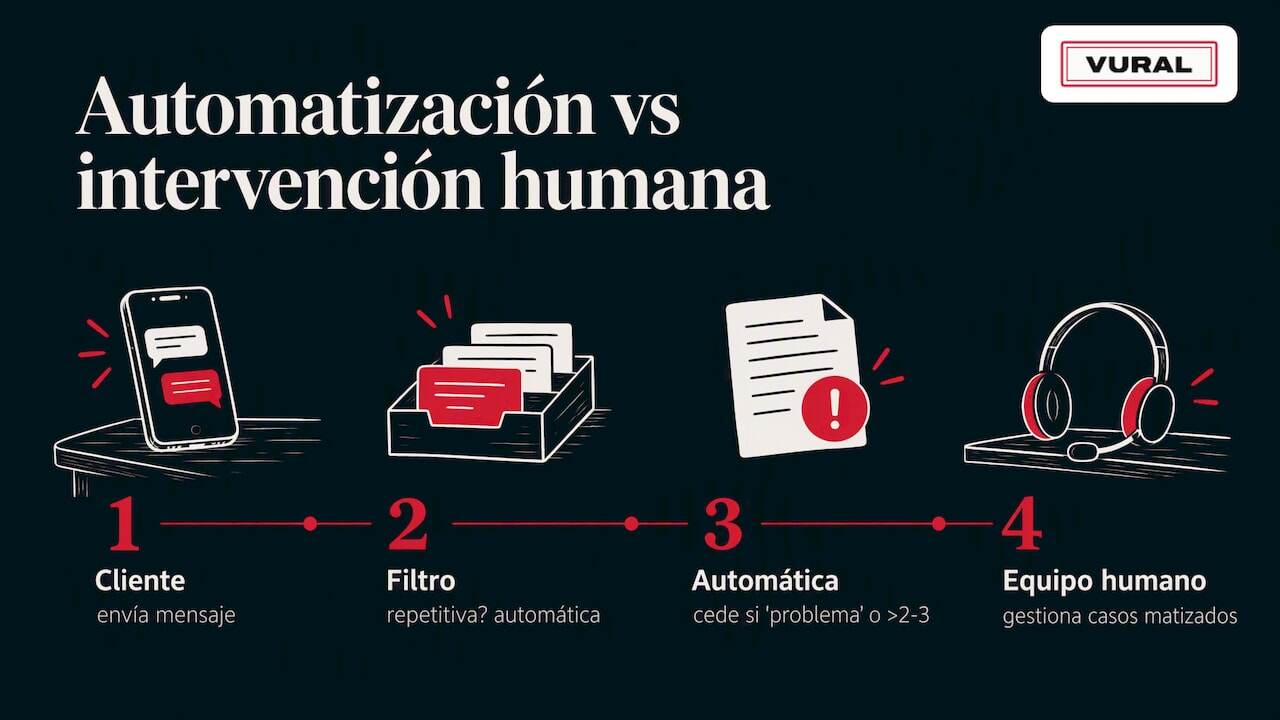
- Automate the repetitive questions, but pass complaints, urgent matters and medical queries to a person; escalate the conversation after two or three exchanges without a resolution.
Table of contents
- What to measure and why: useful indicators for response time
- Quick actions to reduce the feeling of waiting
- Qualifying and filtering enquiries before replying
- Automation versus human input: when to use each
- Ready-made flows and templates for appointment-based businesses
- Measure and optimise: adjusting the process with real data
- Balance and a practical check
- How Vural helps cut response time
- Frequently asked questions
- Sources
What to measure and why: useful indicators for response time
Before changing anything, it helps to know where you're starting from. Three indicators are enough for most appointment-based businesses:
- Average first response time (TTR): how long it takes someone at the business to answer the first message of each new conversation.
- Percentage of replies within a threshold: for example, what share of chats get a reply in under 15 or 30 minutes.
- Customer satisfaction (CSAT): a short question after the appointment (“how would you rate the service?”) that links speed with how it actually felt.
The target you set depends on your resources. A business with a single person on the phone can't promise the same as one with a dedicated front desk, and it's fine to set a goal you can sustain without wearing the team out. What matters is that the target exists and is reviewed, not that it's heroic.
You don't need a complex system to collect the data. Exporting conversations from WhatsApp Business, labelling chats by type of enquiry (new appointment, change, price question) and matching the times messages come in and go out in a spreadsheet already gives a fairly accurate picture. If you use Google Calendar for appointments, you can also compare the time of the enquiry with the time of the confirmed booking, which shows how much time is lost between the initial interest and the booked appointment.
Quick replies let you save plenty of shortcuts for the messages you repeat every day, which drastically cuts the time it takes someone to write a full answer from scratch, as explained in WhatsApp's official help.
Quick actions to reduce the feeling of waiting
It isn't all about genuinely answering faster: sometimes it's enough for customers to feel their message has arrived and that someone will deal with it. That's what three WhatsApp Business features are for, and they're worth setting up as soon as possible.
Away messages can be scheduled for specific times, for example to switch on automatically outside opening hours or while you're closed at the weekend. According to WhatsApp's official help, you can also choose which recipients get them, and the phone or computer running WhatsApp Business needs an active internet connection for them to go out, a technical detail worth checking before relying on them completely.
Quick replies work as text shortcuts you insert with a couple of taps. The limit is 50 saved templates, and some apps automatically generate default replies from your business profile details, such as opening hours or address, as WhatsApp's official help explains. It's worth writing a few for the most frequent questions: the price of a particular service, availability this week or your cancellation policy.
Greeting messages are sent automatically when someone writes for the first time or picks up a conversation after 14 days without activity, according to WhatsApp's official help. It's the perfect moment to give a warm welcome to a customer who writes again after a while, without having to remember to greet them by hand.
On top of this come two habits that don't depend on any setting:
- Use labels in WhatsApp Business to separate “new appointment”, “awaiting confirmation” and “regular customer”: it makes prioritising easier without rereading every chat.
- Add short microcopy to your templates (“we reply within an hour during opening hours”) so customers know what to expect while they wait.
Pro tip: check your WhatsApp business profile before switching anything on: properly filled-in opening hours and address produce more useful automatic replies from day one.
Qualifying and filtering enquiries before replying
Replying quickly doesn't help much if the reply only asks for more details. The aim is for the customer's first message to already include the essentials, so you can resolve it or book the appointment without an extra round of questions.
- Ask only for what changes the answer: the service wanted, the rough day and whether they're a new or regular customer; anything else can wait until confirmation.
- Use a structured message as the first contact: a template that asks for those three details at once, instead of three separate messages that drag the conversation out.
- Filter before the chat starts, where possible: a booking link with those fields already does a good part of the work without anyone at the business typing a word.
What to avoid is the long interrogation. Asking for full name, address, payment method and a detailed reason in the first exchange tends to make the customer give up before they get to the appointment. The rule of thumb: the fewer questions the business needs to decide whether it can take the request, the better.
Some examples of microcopy that reduce drop-off:
- “To get you a slot today, tell me which service you're interested in and which day suits you.”
- “If you let us know whether you're a new customer, we'll suggest the available times straight away.”
- “Reply with the day and time you prefer and we'll confirm shortly.”
This three-level model (reactive, structured, filtered before the chat) lets you scale your service without losing warmth: a small business can stay at the first level and, as message volume grows, it's worth moving towards filtering in advance.
Automation versus human input: when to use each
Not every enquiry deserves the same treatment. Repetitive questions (opening hours, the price of a particular service, the address) are clear candidates for an automatic reply: nothing is gained by having a person answer them instead of a well-written template. Enquiries with nuance, such as a complaint, a special request or a medical question in the case of clinics, need someone from the team behind them.
Where most businesses fall down is the handover between the two. An automatic message that can't recognise when to hand over to a person causes frustration, because the customer feels they're talking to a brick wall. It's worth designing a clear fallback: if the conversation goes past two or three exchanges without resolving the question, or if the customer uses words like “problem”, “complaint” or “urgent”, the system should alert someone on the team instead of insisting with another template.
Tone matters as much as speed. An automatic reply that sounds like a generic form comes across as careless, whereas a template written in the business's own vocabulary (the same words the person at the front desk would use) keeps the feeling of a personal touch even when the reply arrives in seconds.
Pro tip: write your automatic templates as if the person on the front desk were going to read them aloud: if they sound robotic when read, they'll sound that way to the customer too.
Ready-made flows and templates for appointment-based businesses
Having the texts already written saves the time lost improvising each reply. These three flows cover the most common moments in a business that handles appointments on WhatsApp.
1. First qualifying message “Hi! Thanks for getting in touch. To help you faster, tell us which service you're interested in and which day would suit you.”
2. Appointment confirmation with reminder “Your appointment is confirmed for [day] at [time]. We'll send you a reminder the day before.”
3. Re-engaging after a quiet spell “Hello again! We noticed you haven't booked with us for a while. If you like, we can suggest a slot this week.”
Around these three templates it's worth building a complete flow:
- Greeting message at first contact or after 14 days of silence, following WhatsApp's official rule for greeting messages.
- Qualifying question with the minimum details (service and rough day).
- Appointment confirmation with the specific details.
- Automatic reminder one or two days before, which reduces no-shows without anyone having to remember by hand, as explained in our article on WhatsApp appointment reminders.
- Away message outside opening hours inviting the customer to leave their details so you can reply first thing.
For businesses that often suffer no-shows, combining this flow with a deposit-on-booking policy reduces last-minute cancellations.
Measure and optimise: adjusting the process with real data
Once the automatic messages and templates are switched on, it's time to check whether they're really working. You don't need a sophisticated system: the exported chats and the appointment calendar are enough to start.
- Record the time of the customer's first message and the time of the first real reply, not just the automatic one.
- Compare TTR in weeks with away messages switched on against weeks without them.
- Note how many conversations end in a confirmed appointment and how many are left halfway.
A simple experiment is to try two versions of the same qualifying template for two weeks each and compare which produces more confirmed appointments for every ten conversations started. You don't need thousands of chats to see clear differences between a text that asks for one detail and another that asks for three.
Quick replies are partly generated from the business profile, which means that keeping the profile up to date (opening hours, address, services) automatically improves the quality of the default replies, according to WhatsApp's official help.
A practical threshold for reviewing the process: if TTR rises steadily for two weeks in a row, or if the percentage of confirmed appointments drops compared with the previous month, it's time to review the templates and who answers what. It's also worth bearing in mind the European regulatory context on messaging interoperability and privacy, which may affect how customers' contact details are exported or integrated.
Balance and a practical check
The temptation to automate everything is understandable, but the real balance lies elsewhere: templates win the first impression, and human oversight wins the trust that brings the customer back. A business that automates the greeting and the qualifying but leaves the final confirmation and anything unexpected to a person usually sees fewer complaints than one that automates everything without exception.
What appointment-based businesses find hardest isn't switching on WhatsApp's features, which are free and a couple of taps away. It's keeping up the discipline of reviewing the data every few weeks and adjusting the templates when they no longer fit what customers ask.
How Vural helps cut response time
All of the above can be set up by hand, but keeping it up to date takes time. At Vural we bring the diary and the WhatsApp conversation together in one place: we reply to your customers at any hour, including outside opening hours, we handle bookings, changes and cancellations and, on the Pro and Premium plans, we offer cancelled slots to whoever is on the waiting list, all in your business's own tone and without charging a commission per booking.
We set it up for you with your details (the setup has a fixed price depending on the plan) and the monthly fee starts once it's working. Visit Vural to see the Inicial, Esencial, Pro and Premium plans.
Frequently asked questions
What is a good WhatsApp response time for a business?
Under an hour during opening hours usually meets most customers' expectations, and outside those hours an automatic reply confirming the message has arrived is enough. Scheduled away messages cover that window without anyone having to be available all the time.
How do you switch on quick replies in WhatsApp Business?
Quick replies are set up in the business tools of WhatsApp Business, where you can save up to 50 text templates to reply with a shortcut. WhatsApp's official help explains it step by step and notes that some media formats aren't available on every platform.
When is a greeting message sent on WhatsApp?
It's sent automatically when a customer writes for the first time or gets back in touch after 14 days without activity in that conversation. It's a useful way to welcome customers who write again after a while, as WhatsApp's official help explains.
Can Vural handle appointments outside opening hours?
Yes, it can reply to customers and handle bookings on WhatsApp even outside opening hours, so no enquiry goes unanswered. We set it up for you with your details and the monthly fee starts once it's working, with no minimum term.
What details should you ask for before confirming an appointment on WhatsApp?
The service they're interested in and the rough day are enough to suggest available times without needless rounds of questions. Asking for too much at once, such as a full address or payment method in the first message, tends to make the customer abandon the conversation before getting to the appointment.
Sources
More articles

11 October 2026
Appointment confirmation messages: templates ready to use today
Use appointment confirmation messages with ready-made templates for WhatsApp and email. Get more replies, cut no-shows and adapt every text to your business.

10 October 2026
Hotel no-show charges: when they can charge you and how to complain
Find out when a hotel can charge you for not turning up, what conditions it must meet and how to claim a refund if force majeure kept you away.