Digital appointment book: a practical guide for appointment-based businesses
8 October 2026

A digital appointment book is the diary that automates bookings over WhatsApp, confirms appointments and reminds your clients without you having to pick up the phone. For hair salons, beauty centres, physiotherapy centres or dental clinics, connecting this tool to WhatsApp is the quickest way to cut no-shows and win back hours of admin every week.
In short:
- In Germany, two thirds of people already book doctor's appointments online and value not depending on someone answering the phone.
- Automatic reminders cut no-shows, and a waiting list lets you offer a cancelled slot to the next client without phoning round.
- Before connecting WhatsApp and Google Calendar, check that the provider uses official, encrypted connections, and review what data it stores.
- Over the first few weeks, compare bookings handled without human help, no-shows and the time spent managing the diary.
- Vural offers a monthly plan with no booking commission and lets a person step in when the artificial intelligence cannot resolve a query.
Table of contents
- What exactly is a digital appointment book for appointment-based businesses?
- The concrete benefits for your business
- Key features a good digital appointment book should offer
- How to introduce a digital appointment book in your business (practical steps)
- A practical solution: Vural can play this role in your business
- Frequently asked questions
What exactly is a digital appointment book for appointment-based businesses?
A digital appointment book replaces the paper diary or spreadsheet with a system that handles bookings, cancellations, reminders and a waiting list from one place. It also syncs with your usual calendar, typically Google Calendar, so you never have to write anything down twice.
Let's be clear from the start: we're not talking about books of quotations or dating, but about management software for businesses that work by appointment. Hair salons, beauty centres, physiotherapy centres and dental practices use this kind of tool to organise their day and answer anyone asking about availability.
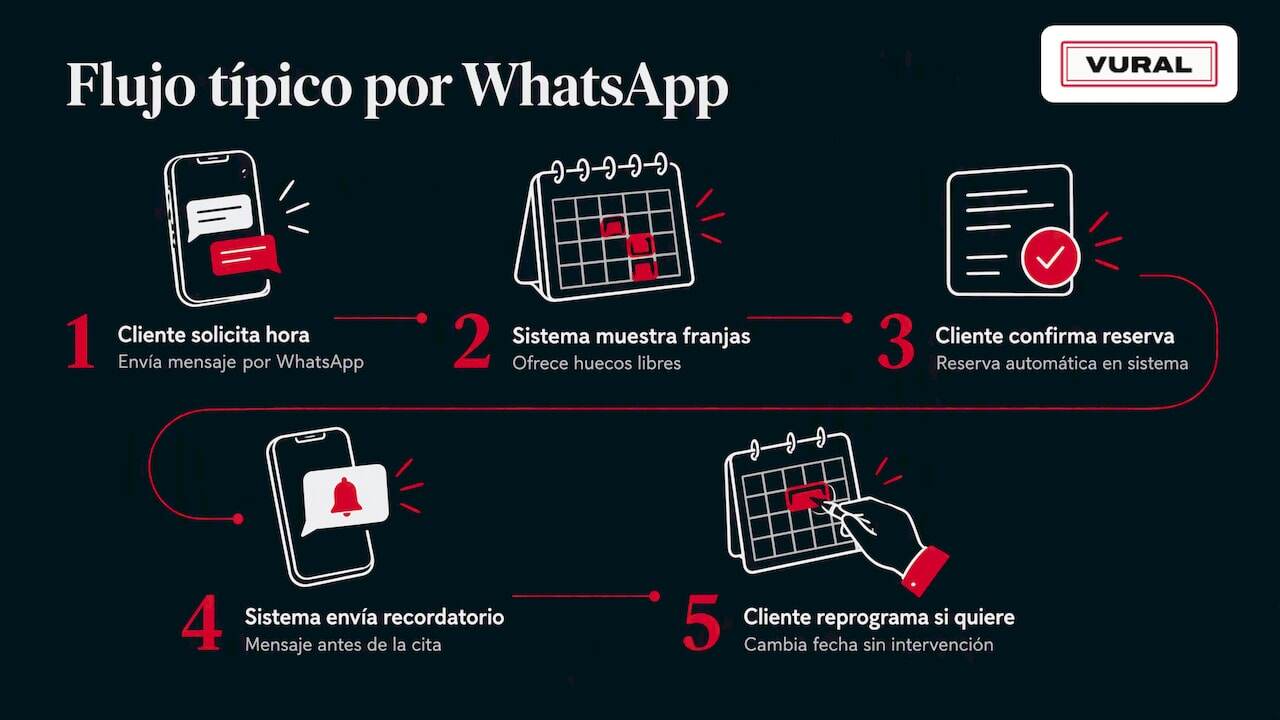
In practice, most of it happens on WhatsApp: the client writes asking for a time, the system replies with the free slots, confirms the booking and sends a reminder before the appointment. If the client needs to change the day, they can reschedule without anyone on the team having to step in. That flow, repeated dozens of times a week, is what sets a digital appointment book apart from a simple shared diary.
The concrete benefits for your business
The most immediate benefit is the time no longer lost on phone calls. In Germany, two thirds of people have booked a doctor's appointment online at some point, and the main reason they give is not depending on someone answering the phone at that moment, according to Bitkom data. The same logic applies to any business with a diary: the fewer calls you have to handle during opening hours, the more time you give the client in front of you.
In short, the concrete benefits are:
- Fewer incoming calls, because clients book directly over WhatsApp.
- Longer availability: bookings can be received and confirmed outside opening hours.
- Fewer empty slots thanks to automatic reminders and the waiting list.
- A more convenient experience for clients, who sort out their appointment in the same chat they already use every day.
People who book appointments online especially value not depending on phone availability, which explains why more and more service businesses are moving their diary to digital channels (Bitkom).
Unannounced no-shows are still one of the biggest hidden costs in hair salons and other centres. A system with automatic reminders and an active waiting list reduces that lost slot, because as soon as someone cancels, the next person on the list can take their place without anyone phoning round one by one.
Key features a good digital appointment book should offer
Not every digital diary does the same thing. Before choosing one, check that it covers these features:
- Bookings and cancellations over WhatsApp, with a reply tone that can be adapted to your business's style.
- Automatic reminders and confirmations, plus a waiting list that alerts the next client when a slot frees up.
- Sync with Google Calendar and simple reports on occupancy and turnover.
- Handling of payments and deposits, always respecting the prices and terms the business has set.
- 24-hour availability through artificial intelligence, with the option for someone on the team to step in when a query needs it.
Pro tip: before switching any system on, check that the tone of the automatic messages sounds like your business and not like a generic machine; it makes all the difference to a client's first impression.
Our guide to appointments over WhatsApp goes into more detail on setting up these flows step by step, and the one on automatic reminders explains which messages work best for each type of appointment.
How to introduce a digital appointment book in your business (practical steps)
Setting up a digital appointment book doesn't require a major technology overhaul. With a clear plan, the process fits into a week.
- Define your policies before you start: cancellations, available time slots, prices and whether you ask for a deposit.
- Connect WhatsApp and Google Calendar to the tool you've chosen.
- Set up the automatic welcome, confirmation and reminder messages.
- Test the complete flows as if you were a client: book, cancel, reschedule.
- Train the team on how to step in when the AI needs human help.
- Announce the change to your regular clients on launch day.
To keep track of whether the system is working, measure from day one:
- Number of bookings handled without human intervention.
- No-shows or last-minute cancellations compared with the previous month.
- Time the team spends managing the diary.
A practical solution: Vural can play this role in your business
We manage your diary straight from WhatsApp, including outside opening hours, so no booking goes unanswered just because nobody was free to reply. The artificial intelligence books appointments, answers basic questions and always sticks to the prices and terms you set.
What we offer, specifically:
- 24-hour service for your clients on WhatsApp, with a person stepping in when needed.
- Connection with Google Calendar and, on the Premium plan, a deposit taken with Stripe at booking for the services you choose.
- A conversational tone that adapts to each business's style, not a generic chatbot.
- No booking commission: you pay a monthly plan and nothing more per appointment handled.
- A fixed-price setup depending on the plan: the monthly fee starts once it's working.
You can write to us from Vural and we'll set it up with your business's details.
Frequently asked questions
What's the difference between a digital appointment book and a paper diary?
A digital appointment book automates bookings, reminders and cancellations without manual work, whereas a paper diary depends on someone answering the phone and writing every change down by hand. The digital version also lets you take bookings outside opening hours.
How does WhatsApp help reduce no-shows in my business?
Automatic WhatsApp reminders give clients enough notice to confirm or cancel, which frees the slot in time for someone else to take it. According to Bitkom, in Germany two thirds of people already book doctor's appointments online and value not depending on phone availability, which explains why this channel is so well received.
How much does it cost to set up a digital appointment book like Vural?
Vural has four plans, Inicial, Esencial, Pro and Premium, from 79 to 999 € a month excluding VAT, plus a fixed-price setup depending on the plan; the monthly fee starts once it's working.
Is it safe to connect WhatsApp and Google Calendar to this kind of software?
Yes, as long as the provider uses official, encrypted connections for both services, which is standard among appointment management platforms for service businesses. Before switching on any integration, check what data is shared and how it is stored.
Does this kind of system work on any device?
Yes. Because it's software you reach through WhatsApp and the browser, it works the same on a phone, tablet or computer with nothing extra to install. That makes it easy for both the team and clients to use without technical hurdles.
Recommendations
More articles

11 October 2026
Appointment confirmation messages: templates ready to use today
Use appointment confirmation messages with ready-made templates for WhatsApp and email. Get more replies, cut no-shows and adapt every text to your business.

10 October 2026
Hotel no-show charges: when they can charge you and how to complain
Find out when a hotel can charge you for not turning up, what conditions it must meet and how to claim a refund if force majeure kept you away.