Automate physiotherapy appointments with AI and WhatsApp
14 October 2026

A practical way to automate appointments at a physiotherapy practice is to connect an AI WhatsApp assistant to your diary and switch on automatic reminders. That way you cut no-shows and win back reception hours. A systematic review of 39 studies supports electronic notifications.
In short:
- A systematic review of 39 studies and 178,729 patients concluded that electronic notifications improve attendance compared with sending no reminders.
- WhatsApp requires the patient's mobile number and consent; use SMS as a fallback and keep email for longer instructions.
- The practice must sign a data processing agreement with the provider and limit reminders to the date, time and place.
- Trial the system for a few weeks and compare no-shows, recovered slots, admin hours saved and the monthly cost.
- Vural's plans cost €79, €199, €399 or €999 a month (excluding VAT), plus a fixed-price setup, and include automatic bookings, a Google Calendar connection and no commission per booking.
Table of contents
- Why is it worth automating your practice's appointments?
- Which channel to use: WhatsApp, SMS, email or automated calls?
- What do you need, technically and legally, before automating?
- How do you roll out automation step by step?
- What does a real AI and WhatsApp flow look like?
- How do you handle cancellations and rescheduling without calling everyone?
- How do you tailor messages to the type of appointment or treatment?
- What do Vural's plans offer?
- How do you measure the return on automation at your practice?
- What to bear in mind when automating in 2026
- A straightforward way to automate your appointments with WhatsApp
- Frequently asked questions
- Sources
Why is it worth automating your practice's appointments?
Every empty slot is an hour on the treatment couch that earns nothing and a physiotherapist left waiting. Automating isn't a tech whim: it's taking off your plate the repetitive tasks that don't need your clinical judgement.
A systematic review of 39 studies and 178,729 patients concludes that electronic notifications (SMS, email and instant messaging) improve appointment attendance compared with sending no reminder at all. In other words, a well-timed reminder is one of the cheapest ways to protect your diary.
The benefits you'll notice first:
- Fewer manual calls to confirm or move appointments.
- Fewer interruptions at reception while you're treating a patient.
- Patients who confirm or reschedule when it suits them, without waiting for you to reply.
- The option to send more than one reminder when the appointment calls for it, such as a first visit.
Time saved is harder to measure than no-shows, but you notice it as soon as you stop doing the round of calls the evening before. In the section on measuring the return we explain how to put a number on it.
Which channel to use: WhatsApp, SMS, email or automated calls?
You don't have to pick just one. What matters is that the message gets through and the patient can reply with no effort.
WhatsApp is where your patients already are. Messages are easy to read and allow a conversation: confirm, cancel or ask for another time with a short reply. Its practical limit is that you need the patient's mobile number and consent to message them there.
According to the systematic review, text messages are seen as less intrusive than a phone call and let patients reply when it suits them, which encourages a positive response.
How the other channels fit in:
- SMS: reaches any mobile without relying on an app, is cheap and works as a fallback.
- Email: useful for sending longer instructions, such as how to prepare for the first session, although it gets read later.
- Automated calls: best kept for critical reminders, for example with patients who don't use messaging. In professional practice it's said they may cut no-shows slightly more than texts, although they cost more and scale less well.
A sensible combination: WhatsApp as the main channel and email or SMS as a fallback if the patient doesn't reply.
What do you need, technically and legally, before automating?
Before switching anything on, your practice should have two things sorted: the system must talk to your diary and it must comply with data protection.
Diary integration. The assistant has to read your real free slots. Without syncing you get double bookings and phantom slots. The usual approach is to connect to Google Calendar or other diaries through their API.
Features worth asking for:
- Accepting payments or deposits to reduce no-shows.
- A waiting list to offer cancelled slots.
- Automatic recovery of freed-up slots.
GDPR and health data. An assistant that manages physiotherapy appointments processes health data. The AEPD guide for healthcare professionals states that the practice, as data controller, must sign a data processing agreement with the provider and ensure security measures are in place. It also points out that the provider must offer sufficient guarantees of compliance.
Apply data minimisation too: the reminder doesn't need to mention the injury or diagnosis. The date, time and place are enough. And always offer an alternative, such as a phone call or an email, for anyone who'd rather not use WhatsApp.
If you'd like to see how we handle this in our service, we explain it on our privacy page.
Pro tip: ask for the data processing agreement before you start, not afterwards; that way you avoid moving real data without legal cover.
How do you roll out automation step by step?
A short, measurable pilot works better than a full rollout. These are the steps.
- Review your current workflows. Spot where you lose the most appointments: first visits, Mondays and Fridays, younger patients.
- Choose channels and templates. Decide what to send and when, with a first and a second reminder. If you need wording ideas, we have templates for confirming appointments and an article on what to remind patients of on WhatsApp, and when.
- Sync your diary and test. Connect the calendar and run tests with dummy appointments before opening the channel to patients.
- Switch on the waiting list, slot recovery and deposits if your practice needs them.
- Measure and adjust. After a few weeks, review what has changed and fine-tune messages and timings.
Indicators worth keeping an eye on:
- Appointment attendance rate.
- Slots recovered thanks to the waiting list.
- Admin time saved at reception.
- Patient replies asking to speak to a person.
For the technical side of bookings, our guide on how to receive and automate bookings on WhatsApp walks through the setup.
What does a real AI and WhatsApp flow look like?
This is how a patient's journey looks when everything is connected:
- The patient messages on WhatsApp at eleven at night asking for an appointment.
- The assistant suggests free slots from your diary and books the one they choose.
- An automatic confirmation arrives with the date, time and address.
- Before the appointment, the patient receives automatic reminders.
- If they don't confirm, they get a message to keep or change the appointment.
- If they cancel, the slot goes to the waiting list and is offered to the next patient.
The AI takes care of booking, reminding, answering basic questions and recovering slots, always within the terms and prices you set. Your team oversees anything sensitive: insurer authorisations, clinical questions and any message where the patient describes symptoms.
To get going faster, start with our guide to WhatsApp appointment reminders, which includes templates and examples.
Pro tip: regularly review the conversations the AI has passed to a person; that's where you'll see which messages need adjusting.
How do you handle cancellations and rescheduling without calling everyone?
A cancellation needn't be a problem if the slot gets filled. What matters is that the patient has an easy way to let you know and the system acts as soon as they do.
In the reminder, include a quick reply to cancel or change. The patient answers with one word and the assistant offers new available dates from your diary, without anyone at reception having to step in.
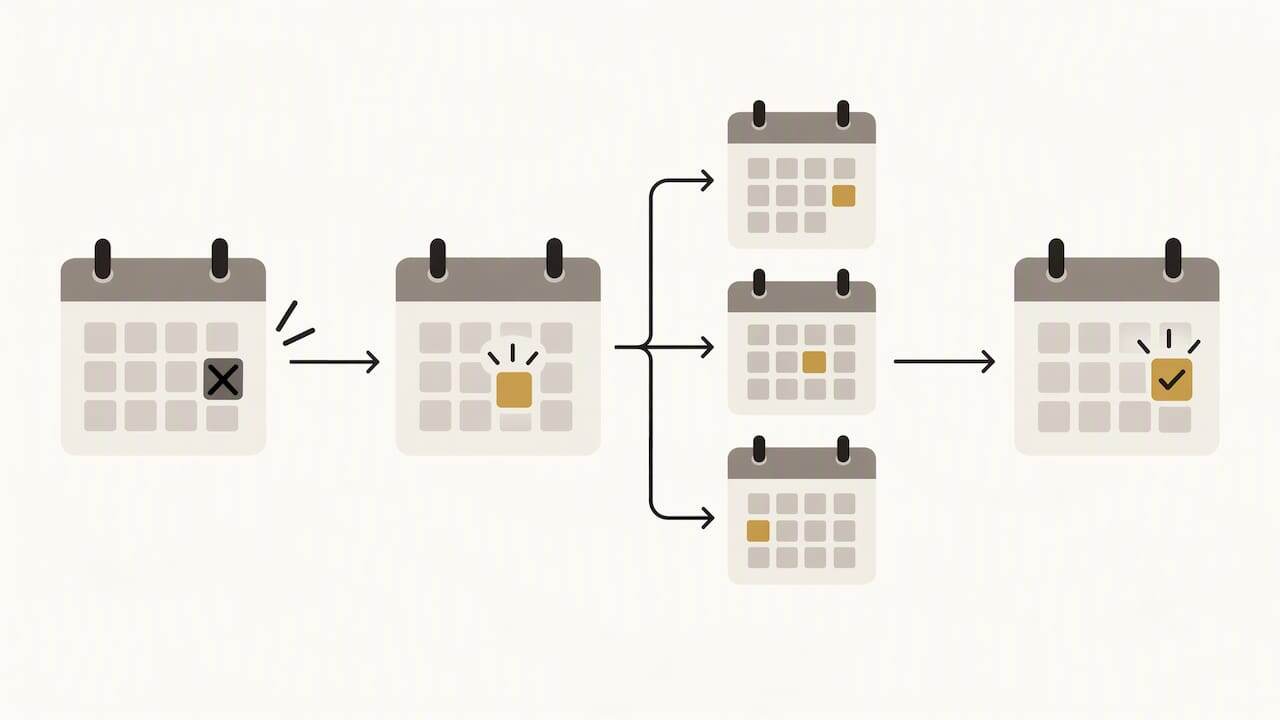
When a slot frees up, the system can alert whoever is on the waiting list and fill it. That way a cancellation becomes a recovered appointment, something that is almost never done by hand for lack of time.
It's worth setting your rules in advance:
- How many hours' notice is needed to cancel free of charge.
- Whether you ask for a deposit for appointments in hard-to-fill slots.
- What happens when a patient cancels late: a warning, a new reminder or contact from a person.
Rescheduling works the same way: the patient picks another time from the free ones and the diary updates instantly. To avoid misunderstandings, the confirmation message should repeat the new date and time.
How do you tailor messages to the type of appointment or treatment?
A first assessment isn't the same as a follow-up session, nor is a pelvic floor appointment the same as a sports rehab one. A single message for everything sounds robotic and gets ignored more.
Tailor at least these variables:
- First visit: add what to bring, how long it lasts and how to get there.
- Follow-up session: a short, direct reminder.
- Treatments that need preparation: mention suitable clothing or whether to avoid eating just before.
- Monday or Friday appointments, or younger patients: these profiles are more likely not to turn up, so a second reminder is worth it.
Tone matters too. Our assistant learns each business's vocabulary and style, so messages sound like your practice and not like a generic template.
Look after privacy: personalise with the type of appointment, not clinical details. “Your session tomorrow at 10:00” is enough; there's no need to name the condition.
Start with two or three variants and only add more if you see the results change.
What do Vural's plans offer?
These are three of Vural's four plans (the fourth, Inicial, costs €79 a month), with the monthly fee excluding VAT as published on our website:
Plan Monthly fee Esencial €199 a month Pro €399 a month Premium €999 a monthIf you need more AI conversation capacity, you can add conversation bundles; current prices are on our website.
What you get in every case is the core of the service: a WhatsApp assistant, bookings, changes and cancellations by message, and a Google Calendar connection, with no commission per booking and no tie-in.
The difference between plans lies in what they automate and the level of service behind them, not in patient volume: the waiting list and the business report are in Pro and Premium, and deposits with Stripe only in Premium. Each plan has a fixed-price setup and the monthly fee starts once it's up and running.
How do you measure the return on automation at your practice?
The return is worked out by comparing what you gain with what you pay. To make it reliable, take your practice's figures before you start and measure again afterwards.
An illustrative example: suppose a session has a given price and that you used to lose appointments to no-shows. If you lose fewer after switching on reminders, you recover sessions and increase revenue. Add to that the reception hours you no longer spend on calls and the cancelled slots filled from the waiting list.
Measure four things:
- No-shows before and after, over the same period.
- Slots recovered through the waiting list.
- Admin hours saved.
- Monthly cost of the service and of the setup.
Compare the same month of another year or an equivalent period so seasonality doesn't mislead you. A pilot of a few weeks is enough to tell whether the investment pays for itself. If the numbers don't add up, adjust messages and frequency before ruling out the tool.
What to bear in mind when automating in 2026
The value isn't in the technology but in the hours it gives back to whoever treats patients. The sensible approach is to start with a short pilot, measure before scaling up and change nothing until you have data. And don't let your guard down with sensitive data: convenience doesn't justify skipping the agreement with the provider.
A straightforward way to automate your appointments with WhatsApp
With Vural, your patients book on WhatsApp at any time, even outside your practice's opening hours, and can change or cancel by message. Our AI follows your terms and prices, checks real availability in your diary (which can be connected to Google Calendar) and, on the Pro and Premium plans, offers cancelled slots to the waiting list, with no commission per booking. Write to us and we'll set it up with your business's details: the setup has a fixed price depending on the plan and the monthly fee starts once it's up and running.
This article is general information and is not a substitute for advice from a qualified doctor. Consult a qualified health professional about your particular case before acting on this content.
Frequently asked questions
What free software can I use to manage appointments?
There are free tools, such as a shared calendar, that are fine for starting out with a few appointments. Their limit is that they don't handle WhatsApp or send reminders on their own. Vural isn't free: it has a monthly fee and a fixed-price setup depending on the plan.
How much does a physiotherapist usually charge per session?
The price varies by city, speciality and session length, and each practice sets its own. That's why your assistant should stick to the rates you set, rather than using generic amounts.
What free apps are there for physiotherapists?
There are free diary and messaging apps that cover the basics. When you want automatic WhatsApp booking, reminders and slot recovery, you usually need a dedicated service.
What is the best appointment management software?
The best one connects to your diary, works on the channel your patients use and complies with GDPR through a data processing agreement. The AEPD points out that the practice must sign that agreement with any provider that processes health data.
Sources
Recommendations
More articles
14 October 2026
How to personalise WhatsApp replies: a practical guide
Learn to personalise your WhatsApp replies with quick replies, greeting and away messages. Serve your customers better and confirm bookings out of hours.

13 October 2026
Appointment confirmation messages: ready-to-use templates
Use appointment confirmation messages with ready-made templates for WhatsApp and email. Get more replies, cut no-shows and adapt every text to your business.