How to avoid overbooking in your appointment diary
31 October 2026

To avoid overbooking in your diary you need three things: a single calendar where every booking lands, rules that stop the same slot being given twice, and a system of confirmations and cancellations that keeps the diary up to date. If today you take appointments by WhatsApp, phone, Instagram and at the front desk, the risk of a double booking is already part of your day. Here is how to close it off, step by step, in a hair salon, a beauty salon or a physiotherapy practice.
In short
- Overbooking in a diary almost always comes from having several places where appointments are written down, with none of them taking priority over the others.
- The basic fix is a single calendar, with real durations for each service and the diary split by staff member and by treatment room.
- Confirming and reminding every appointment cuts errors and no-shows; a waiting list turns each cancellation into a new appointment without double-booking anything.
- If two customers turn up with the same appointment, there is a simple protocol to sort it out without losing either of them.
- An AI assistant on WhatsApp can book, confirm and reassign slots at any hour, following the rules you set.
Table of contents
- What overbooking means in an appointment diary
- Why appointments get double-booked in salons and practices
- Step 1: one calendar for every channel
- Step 2: split the diary by staff member, chair and room
- Step 3: confirm and remind every appointment
- Step 4: cancellations and a waiting list without double bookings
- Step 5: what to do if two customers have the same appointment
- Out of hours: where appointments and errors slip through
- Our view: the diary has to work at night too
- How Vural does it in your day-to-day
- Action plan for this week
- Frequently asked questions
- Sources
What overbooking means in an appointment diary
If you search for “overbooking”, most results talk about airlines selling more seats than they have. In a business that works by appointment the problem is similar, but on a small scale: you give two appointments for the same time, with the same staff member or the same room, or you squeeze in so many appointments that none of them fits in its real time.
There are two kinds of overbooking, and it helps to tell them apart:
- Double booking by mistake: two customers with the same appointment. Nobody wanted it; it happened through an oversight or a sync failure.
- Overload from poor planning: back-to-back appointments with no margin, services that take longer than written down, or one staff member with three customers at once.
Both are avoided with the same habits. The key point is that the problem does not lie with the person on the front desk: it lies with the system used to organise the diary.
Why appointments get double-booked in salons and practices
In practice, double bookings almost always come from one of these causes:
- Several channels with no common hub. One customer messages on WhatsApp, another phones, another drops in. Each one is written down somewhere different: a notebook, a mobile, the computer calendar.
- Replies outside opening hours. Messages sent at night are answered first thing, when the slot you offered has already been taken by someone else at the front desk.
- Cancellations that are not updated. Someone says they are not coming, but the appointment stays in the diary. It is then reassigned by hand and overlaps with another.
- Badly calculated durations. A colour with a cut does not take the same time as a cut alone. A facial does not use the same room as laser hair removal. If everything takes 30 minutes in the diary, an overlap is only a matter of time.
- One diary for the whole team. If you do not distinguish staff member, chair or room, the system cannot know which resource is free.
- Several people writing at once. Reception and staff write in the same notebook without seeing what the other is doing.
Notice that none of the six is a lack of care. They are gaps in the process, and a process can be fixed.
Step 1: one calendar for every channel
The measure that prevents the most overbooking is the simplest: every appointment is written down in one single place, whatever channel it came through. It makes no difference whether it comes from WhatsApp, a phone call or someone who drops in. If it is not in that calendar, it does not exist.
To put it in place:
- Choose one calendar as the single source. It can be a digital appointment book or a shared calendar such as Google Calendar.
- Get rid of parallel notebooks. If someone needs them, keep them for reference only.
- Decide who is allowed to create and move appointments.
- If you use several booking channels, connect them to the calendar instead of copying them by hand.
You will find the full explanation in our guide to centralising appointments from all your channels in one place. And if you still work on paper, a digital appointment book is the logical first step.
Step 2: split the diary by staff member, chair and room
A single calendar is not enough if the whole team shares the same column. The system needs to know which resource each appointment takes up:
- In a hair salon: each stylist and, if needed, each washbasin.
- In a beauty salon: each staff member and each treatment room, because some treatments need a specific room or specific equipment.
- In physiotherapy: each physiotherapist and, if you share a room or equipment, that resource too.
With that split, a slot is only free if both the staff member and the resource are free at the same time. It is the cleanest way to stop two customers clashing. If you want more detail, we explain how to assign appointments by staff member and how to manage the treatment rooms in your beauty salon.
Real durations for each service
For each service, set how long it really takes, including preparation and cleaning time. An indicative example, which you will adjust to your business:
Service Duration usually written down Duration worth booking Cut + styling 30 min 45 min, if it includes washing and drying Colour with cut 1 h Processing time + rinse + cut Facial 45 min 60 min with the room prepared Physiotherapy session 30 min 45 min with notes and a change of couchThe figures are an example of a method, not a standard: time your own services for two weeks and use those times as your baseline.
Step 3: confirm and remind every appointment
An unconfirmed diary is a diary with slots that look taken and appointments that look certain. A good reminder system does two things: it avoids date and time mistakes, and it warns you of no-shows early enough to fill that slot.
A simple scheme:
- When booking: a message with the service, the staff member, the day, the time and the agreed price.
- A day or two before: a reminder with an easy reply, such as “Yes, I’m coming” or “I need to change it”.
- If there is no reply: a second message, and if there is still no answer, you decide whether to release the slot according to your policy.
- After the appointment: where appropriate, a suggestion for the next one.
WhatsApp fits well here because your customers already use it every day. You will find ready-made templates in appointment confirmation messages and a guide to WhatsApp appointments to cut no-shows.
Step 4: cancellations and a waiting list without double bookings
Cancellations are the other side of overbooking. If each cancellation leaves a slot nobody sees, you lose income. If you reassign it in a rush and by hand, that is when appointments get double-booked.
The orderly way to do it:
- Cancelling frees the slot in the calendar straight away. No “I’ll change it later”.
- A waiting list for each service. When someone wants a day that is fully booked, note their interest instead of simply saying no.
- Offer it to the first person on the list. If they accept, the appointment is created and the slot disappears. If they do not reply within a reasonable time, move on to the next.
- A clear cancellation policy. How much notice is needed to cancel and what happens if no notice is given. The clearer it is, the fewer arguments.
For higher-value or longer services, a deposit when booking commits the customer and reduces last-minute gaps. Each business decides whether to ask for one and for which services.
Step 5: what to do if two customers have the same appointment
Even with a good system, it can happen. What matters is how you resolve it. A short protocol that the whole team knows:
- Check who booked first. Look at the message log or when the appointment was created. That person keeps their time.
- Contact the other person as soon as possible, before they arrive. A call or a direct WhatsApp message.
- Offer specific alternatives: two or three nearby slots, with another staff member if possible. Do not ask “when suits you?” without suggesting anything.
- Apologise naturally and, if the service is long or the change is a nuisance, consider a reasonable gesture, such as priority for the next slot.
- Find out where the mistake came from. If it was an unsynced channel, close it. If it was a wrongly set duration, correct it.
A quick apology and a specific solution are usually worth more than a long explanation.
Out of hours: where appointments and errors slip through
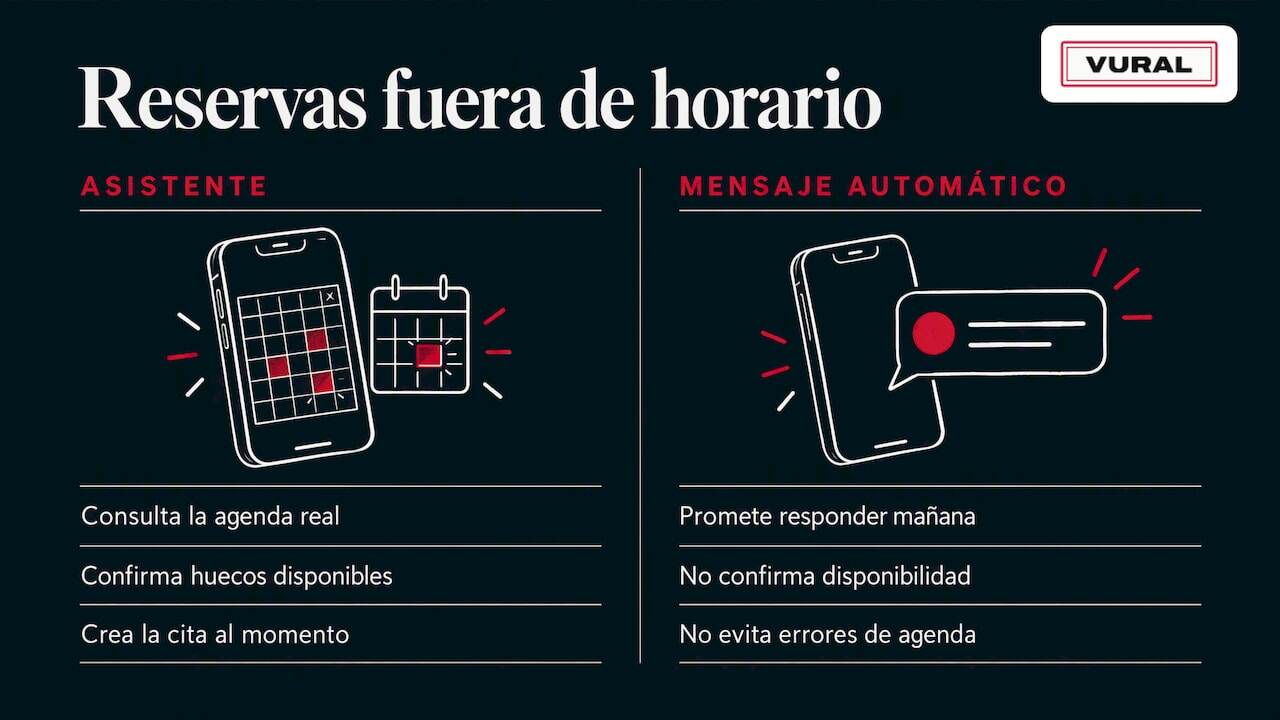
Many bookings arrive at night, during breaks or on Sundays. If you reply the next day, there are two risks: that the customer goes elsewhere and that the slot you offer is no longer free. With a manual diary, those pending messages are also the typical source of errors.
To handle bookings out of hours you have two options: automate the reply with an assistant that checks your real diary, or leave an automatic message that only says “we’ll reply tomorrow”. The second prevents nothing; the first does, because the appointment is created in the calendar straight away.
Which customer data you need to protect
When you manage bookings you store names, phone numbers, service history and, in physiotherapy or other healthcare practices, sometimes health information. In Spain, personal data protection is governed by Organic Law 3/2018 on the Protection of Personal Data and the Guarantee of Digital Rights, in force since 7 December 2018. That same date marks the repeal of Organic Law 15/1999, which already required technical and organisational measures to prevent the loss, alteration of or unauthorised access to data.
In practice:
- Keep only the data you need to give the appointment.
- Limit who has access to the diary and the history.
- If there is health data, handle it with particular care and ask your adviser or data protection officer which obligations apply to you.
- Tell your customers what you use their data for when you message them on WhatsApp.
We explain it in more detail in WhatsApp and GDPR: how to comply without losing bookings. And if you keep client records in your salon, see what to include in a client record.
Our view: the diary has to work at night too
At Vural we think overbooking is not fixed with more attention or more hands, but by removing the reason it happens: the diary information is scattered. When WhatsApp, the calendar and the notebook tell different stories, sooner or later two customers get the same time.
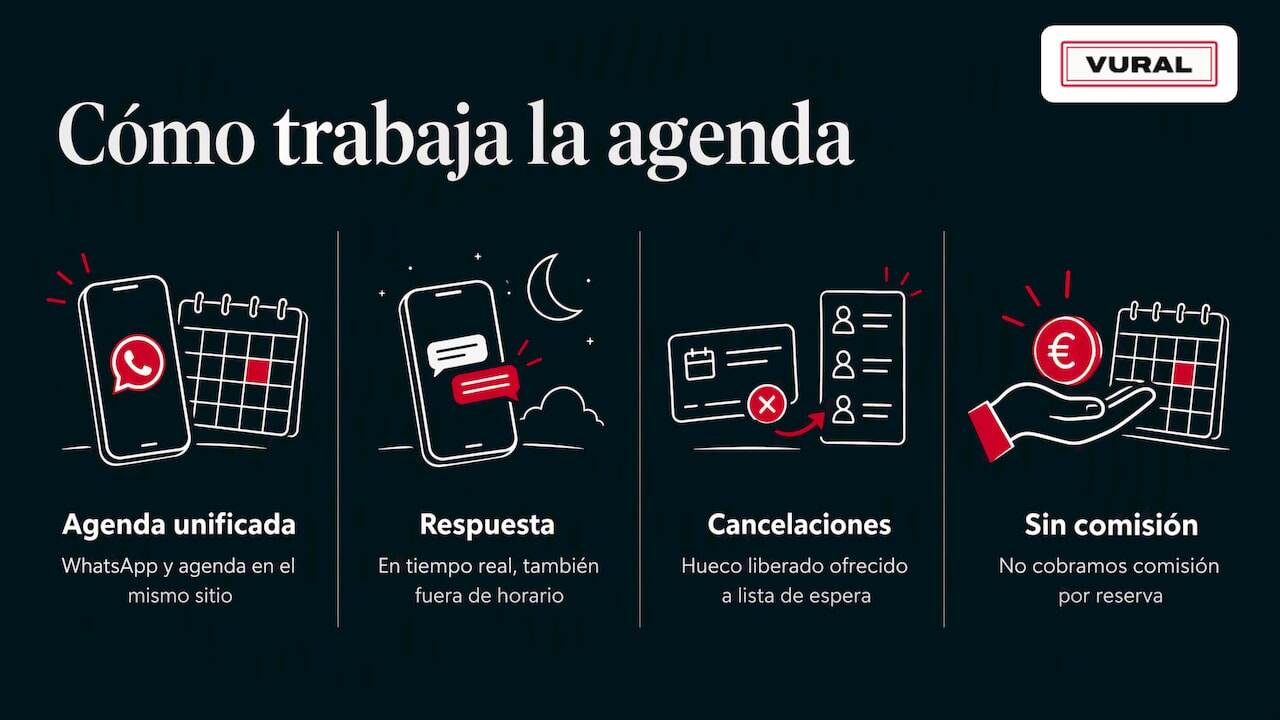
That is why we designed Vural so that the diary and the conversation are in the same place. The assistant replies on WhatsApp in real time, out of hours too, and only books slots that exist in your diary, respecting the services, terms and prices you have set. When someone cancels, the slot is freed and, on the Pro plan, we can offer it to the waiting list, so each cancellation has a chance of becoming a new appointment without going through your hands.
We charge no commission per appointment and there is no minimum term. We believe a booking tool should help you fill your business, not take a cut of every appointment. And the assistant learns your business's tone and vocabulary, so your customers feel they are being looked after by your team and not by a form.
How Vural does it in your day-to-day
If you want to see it in your own business, Vural is an AI virtual assistant that manages your diary over WhatsApp. It books, changes and cancels appointments, keeps a record for each customer (previous appointments, notes and preferences) and connects with Google Calendar. On the Pro plan it offers cancelled slots to the waiting list and prepares the business report; the weekly summary and deposits with Stripe when booking are on both plans.
The published monthly plans are:
Plan Price Solo €49 a month Pro €69 a monthPrices exclude VAT. On top of this comes the setup, a one-off fixed-price payment depending on the plan: €299 on Solo and €499 on Pro, and you can add AI conversations in packs of 100 conversations for €19. We set it up with your business's details and the monthly fee starts once it is working. You can see all the details in Vural's plans.
Action plan for this week
You do not have to change everything at once. Here is a realistic sequence:
- Day 1: list every channel appointments come in through and decide which is your single calendar.
- Day 2: split the diary by staff member and by room or chair.
- Day 3: time and correct the real duration of your five most frequent services.
- Day 4: write your confirmation and reminder messages.
- Day 5: set your cancellation policy and start a waiting list.
- Day 6: write the protocol for when two customers clash and share it with the team.
- Day 7: check which appointments slipped through out of hours and decide how to cover them.
If you want more ideas for each type of business, you will find more articles for appointment-based businesses on the blog.
Frequently asked questions
What can you do to avoid overbooking in an appointment diary?
Centralise all bookings in a single calendar, split the diary by staff member and room, and set each service's duration to what it really takes. Add confirmations and reminders, and free up slots as soon as someone cancels. Those four measures prevent the vast majority of double bookings.
How do I stop bookings from several channels overlapping?
Make every channel end up in the same calendar, without copying appointments by hand. If one customer messages on WhatsApp and another phones, both must create the appointment in the same diary, which shows instantly which slot is free. The fewer places to write things down, the fewer mistakes.
Is a waiting list worth it if I don’t get many cancellations?
Yes, because it saves you from simply saying “there are no slots” and losing the customer. You note their interest and, if a cancellation comes up, you offer them that slot. It also tells you which days and services have more demand than you can cover.
What do I do if a customer arrives and their appointment is double-booked?
Keep the time for whoever booked first and offer the other person specific, nearby alternatives, with a brief apology. Then check where the mistake came from so you can close it off. The sooner you let them know, the less inconvenience it causes.
Can an AI assistant manage the diary without double-booking?
Yes, as long as it checks the same calendar your team uses and follows the rules you set, such as services, durations and prices. With Vural the assistant books on WhatsApp against your real diary and connects with Google Calendar.
Sources
- Organic Law 3/2018 on the Protection of Personal Data and the Guarantee of Digital Rights (BOE)
- Organic Law 15/1999 of 13 December on the Protection of Personal Data (BOE)
Recommendations
More articles

1 November 2026
How to ask your customers for reviews on WhatsApp in 2026
Learn how to ask for Google reviews on WhatsApp: when to send the request, how to get the link, templates for each type of business and what Spanish law says.

30 October 2026
Hair salon reports: which ones to use and what to measure
Which reports a hair salon needs, what data to check every week and every month, and how to use it to fill your diary and look after your clients' data.