How to assign appointments by staff member in your business
27 October 2026

Assigning appointments by staff member means making sure every booking lands in the right person's diary, with their hours, their services and the real length of each one. It takes three steps: you define what each member of staff can do, you mark when they work, and you decide whether the customer chooses or the system assigns. With those rules clear, double bookings and gaps nobody notices are a thing of the past.
In this guide we explain how to set it up in a hair salon, a beauty centre, a physiotherapy centre or a dental clinic. You will see what information to prepare, how to avoid clashes and what to do about absences and cancellations. You will also see what happens to your customers' data, something that has its own rules in Spain.
In short
- Before assigning anything, define for each staff member: the services they offer, how long each one takes, their hours and their breaks.
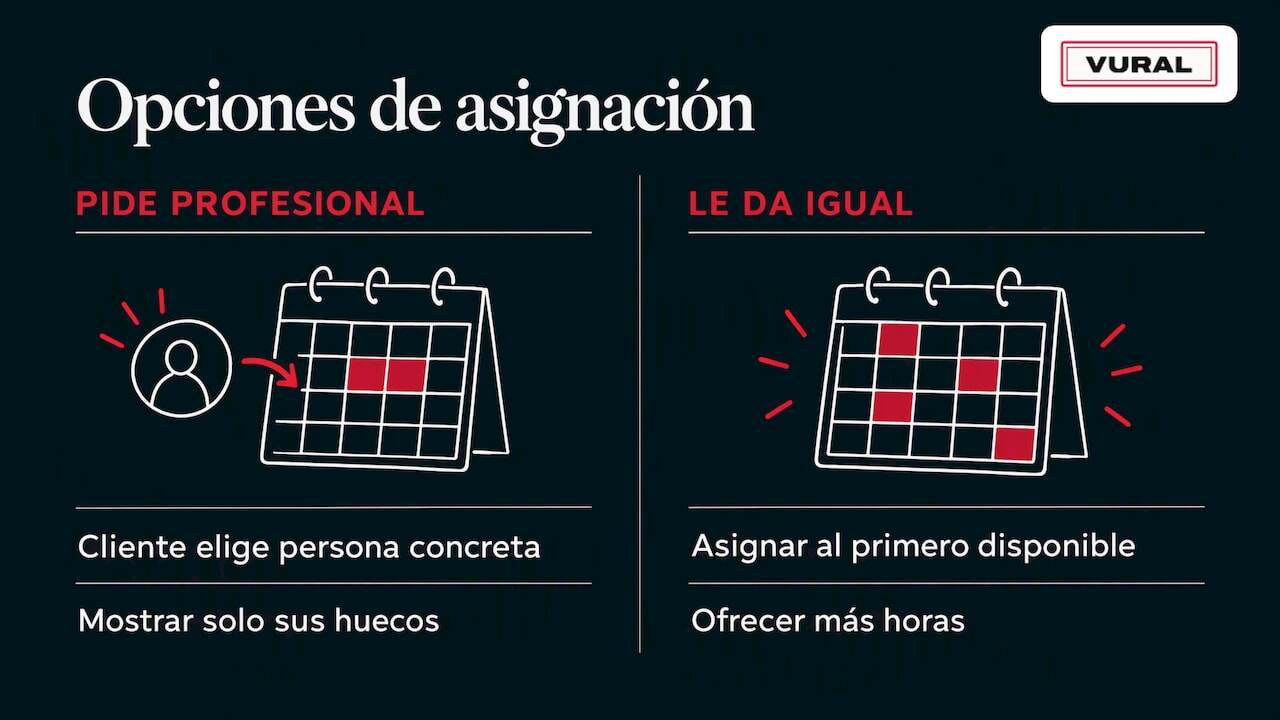
- You have two models: the customer chooses the staff member, or the system assigns the first one free. Many businesses combine both.
- A single shared diary prevents double bookings. Several separate diaries (paper, mobile, WhatsApp) cause them.
- Automatic confirmations and reminders mean fewer forgotten appointments, and a waiting list helps fill the slots that free up.
- Customer data requires security measures and clear information under the GDPR and Spain's data protection act.
Contents
- Why it pays to assign each appointment to a staff member
- Step 1: prepare each staff member's details
- Step 2: decide who chooses the staff member
- Step 3: avoid double bookings and clashing times
- Step 4: handle absences, breaks, cancellations and changes
- Step 5: confirm the appointment and send reminders
- Step 6: what happens outside working hours
- Your customers' data: what to look after in Spain
- Our view: the diary should fit your team
- How Vural does it and what it costs
- Checklist for assigning appointments by staff member
- Frequently asked questions
- Sources
Why it pays to assign each appointment to a staff member
When your team is just you, the diary is a notebook. When there are three, four or ten of you, the problems start:
- Two customers book the same time with the same person.
- Someone asks for a service that staff member doesn't offer.
- A regular wants their usual stylist and nobody writes it down.
- A sick day or an afternoon off means moving fifteen appointments by hand.
Assigning by staff member solves this because every appointment is tied to one person, one service and one specific slot. You see each person's workload. Each staff member sees only their own. And the customer gets a time that can actually be kept.
If you still keep track on paper or in several places at once, start with this guide to the digital appointment book.
Step 1: prepare each staff member's details
Assignment only works if the diary knows your team. Before setting anything up, gather this information for each staff member.
Services they offer
Not everyone does everything. In a hair salon, perhaps one person does colour and another only cuts. In physiotherapy, some practitioners do pelvic floor work and others sports physio. List the services per person. It is the rule that prevents the most mistakes.
Real length of each service
Note how long each service really takes, including waiting times (for example, how long a colour is left to develop) and the margin for cleaning or preparing. A 45-minute appointment that actually takes an hour throws the whole afternoon out.
The length can vary by staff member. If someone is quicker at a service, note it down. If you don't, the system will offer times that don't match reality.
Hours and breaks
Define for each person:
- Working days and hours, including split shifts.
- Lunch and other breaks.
- Holidays and days off already known.
- Hours set aside for internal tasks, such as training or stock management.
A break also counts as time that can't be booked. If you don't block it, it will show up as a free slot.
Shared resources
Sometimes the limit isn't the person but the space or the equipment: a treatment room, a backwash chair, a radiofrequency machine, a dental chair. If two staff members share a resource, the diary has to take it into account. It is very common in beauty, and we cover it in this guide to managing your centre's treatment rooms.
Step 2: decide who chooses the staff member
There are three ways to share out appointments. Each suits a different kind of business.
Model How it works When it fits The customer chooses Picks a staff member and sees only their free times Hair salons, beauty, physiotherapy with loyal customers Automatic assignment The system gives the appointment to the first free staff member who offers that service Same services across staff, large teams, high demand Mixed The customer can choose or say “anyone is fine” Almost any business with a teamWhen the customer chooses
It is what many regulars expect. Someone who has seen the same hairdresser or physio for years doesn't want to be switched. The advantage is loyalty. The drawback is that some diaries fill up while others are left with gaps.
When the system assigns
It stops one staff member sitting idle while another is swamped. You decide the rule: the first one free, whoever has the lightest load that day, or whoever specialises in that service. It works well in dental clinics with standard services, such as a check-up or a clean.
The mixed model
It is the most practical. You ask the customer: “Would you like someone in particular, or is anyone fine?” If anyone is fine, they get the first available person and more times to choose from. If they ask for someone, only that person's free slots are shown.
That translates very well into a WhatsApp conversation, which is where many customers already message you. We explain how it works in this guide to WhatsApp bookings.
Example: a hair salon with three stylists
Picture a hair salon with Marta (colour and cuts), Luis (cuts and beards) and Ana (styling and updos).
- A customer writes: “I'd like highlights on Thursday afternoon.”
- Only Marta does colour, so only her Thursday slots are checked.
- If Marta is free at 17:00 and the service takes two hours, that time is offered.
- The customer confirms and the appointment goes into Marta's diary, with the service and its length.
The customer didn't need to know who does what. The diary already knew.
Step 3: avoid double bookings and clashing times
Double bookings almost always come from the same place: there is more than one place where appointments are written down. The front-desk phone, a notebook, WhatsApp messages on a personal mobile and a separate calendar. Nobody sees everything at once.
To avoid it:
- One diary as the single source of truth. Every appointment, wherever it comes from, is entered there.
- Block the slot as soon as it is booked. Once a time is confirmed, it is no longer available to anyone else.
- One orderly way in. If customers message on WhatsApp, that conversation should feed the diary directly, not a notebook.
- A synced calendar. If your staff use Google Calendar, it is worth connecting the diary so that their personal events also block out times.
Bringing the diary and communication together in one platform is exactly what avoids the chaos of several systems. That is Vural's approach.
Step 4: handle absences, breaks, cancellations and changes
Assignment doesn't end once the appointment is given. The hard part comes when something changes.
When a staff member is absent or off sick
If someone is off for a day, you have three options for the appointments already booked:
- Reassign them to another staff member who offers the same service, letting the customer know.
- Offer a new time with the same person.
- Cancel and offer alternatives.
The key is not to decide each appointment by hand. With the rules on who does what already defined, reassigning takes minutes rather than a whole afternoon on the phone.
Cancellations and time changes
An unmanaged cancellation is a lost slot. Ideally the customer can cancel or change their appointment themselves, at any time, without phoning. That way you get the slot back sooner.
Then there are two ways to fill it:
- Waiting list: customers who wanted that slot when there was nothing free. They are told when it opens up.
- Filling freed slots: offering the freed-up time to customers it suits, starting with those who asked for it.
On the Pro plan, Vural automatically offers the cancelled slot to whoever is on the waiting list. You can see the details on our plans page.
Deposits and cancellation terms
If no-shows hurt your business, you can ask for a deposit when booking. It isn't always worth it, and it depends on the service and the customer. You can see when it makes sense in this guide to advance payment for appointments.
Step 5: confirm the appointment and send reminders
An assigned appointment that the customer forgets is an hour lost for that staff member. The confirmation and the reminder are the final piece.
A simple sequence:
- On booking: a confirmation with the day, time, service and staff member's name.
- A day or a few hours before: a reminder with the option to confirm, change or cancel.
- After the appointment: where appropriate, a thank-you message or a note about the next check-up.
The staff member's name matters. A message like “See you tomorrow at 17:00 with Marta for your highlights” is reassuring and shows you are well organised.
You will find ready-made wording in these appointment confirmation templates and an explanation of the right timing in the guide to WhatsApp appointment reminders.
Step 6: what happens outside working hours
Many bookings are requested when the business is closed: at night, over lunch or on a Sunday. If nobody answers, the customer usually messages somewhere else.
A virtual assistant can handle that conversation there and then. In Vural's case:
- It replies on WhatsApp in real time, outside opening hours too.
- It offers free times based on the diary and the business's rules.
- It books, changes or cancels appointments.
- It answers basic enquiries, always with the terms and prices you have set.
- It adapts its tone and vocabulary to your business.
In the morning, your team finds the appointments already in each staff member's diary. For more context, see this guide to the WhatsApp away message.
What an assistant must never do is make up terms. That is why it is key to load the rules, services and prices properly from the start.
Your customers' data: what to look after in Spain
Assigning appointments by staff member means storing data: name, phone number, service history and, in physiotherapy or dental clinics, data that may be health data. It is worth bearing in mind from the start.
These are the basics:
- Security measures suited to the risk. According to the AEPD (the Spanish Data Protection Agency), controllers and processors must apply appropriate technical and organisational measures, review them and choose processors that offer sufficient guarantees, as set out in its report on breach notifications.
- Breaches. In the same report, the AEPD states that high-risk breaches, such as the hotel booking breaches it describes, must be documented, notified to the authority (Article 33 of the GDPR) and communicated to those affected (Article 34).
- Information when collecting data. Spain's Organic Law 3/2018 requires the basic information to include who the controller is, what the data will be used for and how to exercise the rights in Articles 15 to 22 of the GDPR.
In practice: give each staff member access only to what they need, don't share data over personal channels and explain to customers how their data is handled. If you work with WhatsApp, this guide to WhatsApp and the GDPR helps you comply without losing appointments. If you keep service notes, see how to keep a salon client record. And if you are unsure about a specific case involving health data, ask a data protection adviser.
Our view: the diary should fit your team
Businesses that work by appointment share the same pattern. The problem is rarely a lack of customers. It is that bookings arrive through lots of channels, at odd hours, and someone has to sort them out by hand.
We believe a well-assigned diary starts with clear rules and ends with an easy conversation for the customer. That is why we work like this:
- The diary and communication sit in one platform, so there isn't a separate system for everything.
- The assistant replies on WhatsApp at any hour, following your business's terms and prices.
- We charge no commission per appointment and there is no minimum term. You pay the monthly fee, not a percentage of each appointment.
- On the Pro plan, we offer cancelled slots to the waiting list so you don't lose income.
A staff member whose diary is full of scattered gaps loses money without noticing. One with a well-balanced diary works more calmly. That is what we are after.
How Vural does it and what it costs
Vural is an AI virtual assistant that manages the diary and bookings on WhatsApp for hair salons, beauty, physiotherapy and dental clinics. It books, changes and cancels appointments, keeps a record for each customer (past appointments, notes and preferences) and connects to Google Calendar. On the Pro plan it offers cancelled slots to the waiting list and prepares the business report; the weekly summary and taking a deposit with Stripe at booking are on both plans.
The published plans are:
Plan Price Solo €49 a month Pro €69 a monthPrices exclude VAT. On top of this there is the set-up, a one-off fixed-price payment depending on the plan: €299 on Solo and €499 on Pro. You can also top up with bundles of 100 AI conversations for €19. We set it up with your business's details and the monthly fee starts once it is working, with no minimum term and no commission per appointment. You can see the full plans at vural.io. The terms on fees, cancelling and data are in the terms of service.
Checklist for assigning appointments by staff member
Before you take the step, go through this list:
- I have the list of services for each staff member.
- I know the real length of each service, including waiting and cleaning time.
- Hours, breaks and holidays are entered.
- I have decided whether the customer chooses, the system assigns, or a mix.
- All appointments go through a single diary.
- There is a clear procedure for absences and cancellations.
- Confirmations and reminders always include the staff member's name.
- I know what data I keep, who sees it and how I inform the customer.
If you tick six or more, your foundations are in place. If not, start with the first three points: they prevent the most mistakes.
Frequently asked questions
Can I let the customer choose a staff member and also have it assigned automatically?
Yes, that is the mixed model and the most common. You ask the customer whether they want someone in particular or anyone is fine. If they ask for a person, you see only that person's slots. If anyone is fine, it goes to the first free staff member who offers that service.
How do I stop two customers booking the same time with the same staff member?
Use a single diary and block the time as soon as the booking is confirmed. The problem appears when appointments are written on paper, on a personal mobile or in several calendars. The fewer places, the fewer clashes.
What do I do if a staff member calls in sick at short notice?
Check their appointments for the day and reassign them to another staff member who offers the same service, or offer the customer a new time. Let them know as soon as possible with a clear message. If the rules on services per staff member are defined, the process is much quicker.
Can a virtual assistant book appointments when the business is closed?
Yes. An assistant like Vural's replies on WhatsApp at any hour, offers free times and books according to the terms you have set. It also handles basic enquiries. Your team finds the appointment already in the diary when they open.
Do I need to worry about data protection when managing appointments?
Yes, because you store personal data and, in some businesses, health data. You must apply appropriate security measures, tell customers who processes their data and why, and know how to act if there is a breach. If you have specific questions, ask a specialist adviser.
Sources
Recommended reading
More articles

1 November 2026
How to ask your customers for reviews on WhatsApp in 2026
Learn how to ask for Google reviews on WhatsApp: when to send the request, how to get the link, templates for each type of business and what Spanish law says.

31 October 2026
How to avoid overbooking in your appointment diary
Why appointments get double-booked in hair salons, beauty salons and physio practices and how to stop it: one calendar, confirmations and a waiting list.