24/7 WhatsApp customer service for appointment businesses
26 October 2026

Offering 24/7 customer service on WhatsApp means your customer can message at any time and get an answer straight away: the price of a service, a free slot or the confirmation of their appointment. You and your team don't need to be glued to your phones. You can do it with simple automatic replies or with an AI assistant connected to your diary. This guide explains what options you have, what is worth automating, when a person should step in and how to check that everything works.
In short
- 24/7 service doesn't mean working 24 hours: it means no message goes unanswered until the next day.
- There are several levels, from the away message and quick replies up to an AI assistant that books, changes and cancels appointments.
- Automate the repetitive work (opening hours, prices, free slots, reminders) and leave the delicate cases to a person.
- In Spain, commercial communications sent by electronic means are subject to rules from the AEPD: take care with consent and make opting out easy.
- Check a few metrics every week: response time, after-hours bookings, recovered cancellations and cases handed over to a person.
Table of contents
- What 24/7 service on WhatsApp really means
- What options you have for after-hours service
- Which tasks an assistant can automate and which it can't
- How bookings, changes and cancellations work on WhatsApp
- Privacy and data: what to look after in Spain
- How to check that automated service is working
- Our view: being available shows up in the till
- How Vural does it
- How to get started without overcomplicating it
- Frequently asked questions
- Sources
What 24/7 service on WhatsApp really means
Think about when your customers message you. Lots of people remember to book an appointment at night, on the underground or on their break. If they message at 22:30 and nobody replies until 10:00, there's a clear risk: they book somewhere else while they wait.
Offering 24/7 service on WhatsApp doesn't mean you have to be available. It means that the channel always answers and that the answer is useful. Good round-the-clock service covers four things:
- Reply quickly: the customer knows their message has been read.
- Resolve: give prices, opening hours and free slots, not just a "we'll get back to you tomorrow".
- Book: the appointment goes into the diary without anyone writing it down by hand.
- Hand over: if the case is complicated, a person is alerted and the customer is told when they'll hear back.
That last point is key. Honest 24/7 service doesn't pretend to be a person or promise what it can't deliver.
What options you have for after-hours service
Not every business needs the same thing. These are the usual routes, from the simplest to the most complete.
Away and greeting messages
It's the first step and the cheapest. WhatsApp Business lets you tell customers that you're closed and when you'll reply. It helps you manage expectations, but it doesn't solve anything: the person is still waiting. If you want to set it up properly, there's a guide in our article on the WhatsApp away message and several examples in the WhatsApp templates for businesses.
Quick replies and catalogue
They let you answer the typical questions in seconds: address, prices, how to get there. They save time during working hours, but someone still has to press the button. After hours, the customer still gets no personalised answer.
Link to an external booking system
Many businesses share a link so the customer can book on another website. It works for people who are used to it, but it forces them to leave the conversation. Some customers give up. And you end up with the diary in one place and the messages in another.
AI assistant built into WhatsApp
This is the level that really delivers 24/7 service. The assistant chats with the customer on WhatsApp, checks your diary, suggests free slots, and confirms, moves or cancels the appointment. And it does so with the terms and prices you have set.
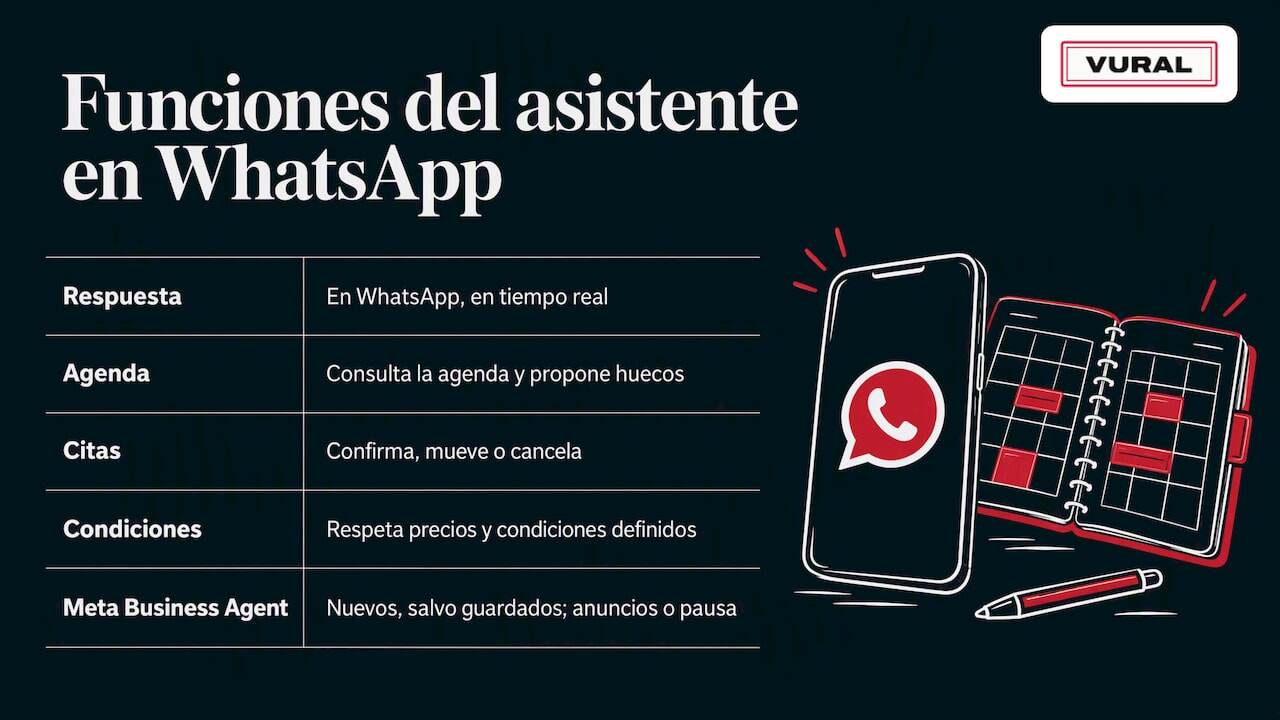
WhatsApp already includes its own AI tools for businesses. Its help documentation describes Meta Business Agent as a feature that can reply to customers and lets you choose whether it acts in all new chats, in all except saved contacts, in conversations that come from ads, or stays paused while it learns. That flexibility is useful. For a business that runs on appointments, what makes the difference is the AI being connected to your appointments, your services and your payments.
Comparison table
Option Answers after hours Books appointments by itself Effort for you Away message Yes, it only informs No Very low Quick replies No, you send them No Low External booking link Partly Yes, outside the chat Medium AI assistant with diary Yes, it chats and resolves Yes, inside the chat Medium at first, low afterwardsWhich tasks an assistant can automate and which it can't
The rule of thumb: automate what repeats and can be decided with clear rules. Leave to a person anything that needs judgement, empathy or an exception.
What is worth automating
- Basic enquiries: opening hours, location, duration and price of each service.
- New bookings: choosing the service, the professional and the slot.
- Changes and cancellations: the customer moves their appointment without calling.
- Reminders: they cut down on forgotten appointments. There's a practical guide on WhatsApp appointment reminders.
- Waiting list: if a slot opens up, it's offered to whoever was waiting.
- Deposits and payments: asking for a deposit to confirm the appointment. Here's more detail on taking payments over WhatsApp.
- Customer history: remembering their last service or their preferences to look after them better.
When a person should step in
- Complaints, mistakes in a service or annoyed customers.
- Health questions that need professional judgement, for example in physiotherapy or at a dental clinic.
- Unusual requests: special discounts, large groups, events.
- Any time the customer asks to speak to someone.
Ideally, the assistant alerts your team with a summary of the conversation. That way whoever picks up the chat doesn't ask the same questions again.
How bookings, changes and cancellations work on WhatsApp
A well-designed flow is short and clear. Picture a hair salon that closes at 20:00:
- 22:15: a customer writes "Have you got a slot for highlights on Saturday?".
- 22:15: the assistant asks about the duration or the exact service, and checks the team's diary.
- 22:16: it suggests two or three real slots.
- 22:17: the customer picks one. The appointment is created and the confirmation is sent.
- The day before: it's worth sending them a reminder.
- If they cancel: the slot is freed up and offered to the waiting list.
It all happens while you rest. The next morning you just see the appointment in your diary.
If you'd like to see the whole process with more examples, we explain it in WhatsApp bookings: how to receive and automate them. And if you run a physiotherapy practice, there's a specific case in automating physiotherapy appointments with AI and WhatsApp.
Make it sound like your business
A robot that talks like a robot scares customers off. A good assistant uses your business's tone and vocabulary: friendlier in a hair salon, more measured in a clinic. We explain how to get there in how to personalise your WhatsApp replies.
Privacy and data: what to look after in Spain
Serving customers on WhatsApp means handling personal data: name, phone number, service history. There are two basic ideas.
- Inform people and collect only what you need. Ask for the details the appointment requires and nothing more.
- Be careful with promotional messages. Confirming an appointment is one thing; sending advertising is another. According to the AEPD, commercial electronic communications may be sent without prior consent if there is a prior contractual relationship, the contact details were obtained lawfully and the advertising is for similar products or services. You must also offer a simple, free way to object when you collect the data and in every communication.
In practice: if a customer tells you they don't want any more messages, stop sending them promotions and make a note of it. To go deeper, see our guide WhatsApp and GDPR for businesses. If you handle health data, as in physiotherapy or dental clinics, check with your adviser or data protection officer before deciding what the assistant stores.
How to check that automated service is working
An assistant isn't something you install and forget. Review it calmly over the first few weeks and then regularly. These are the most useful metrics:
- Time to first response: it should be a matter of seconds, at night too.
- Bookings made after hours: this tells you how much business you're winning back.
- Conversations that end in an appointment: if many end without one, something in the flow isn't working.
- Cases handed over to a person: too many means answers are missing; very few may mean the right cases aren't being handed over.
- Recovered cancellations: slots that get filled again.
- No-shows: these should fall with reminders and deposits. If that's your situation, see how to reduce no-shows with WhatsApp appointments.
A 15-minute weekly routine
- Read five conversations at random and check the tone and accuracy.
- Review the handed-over cases and add the answers that were missing.
- Look at how many new appointments came in at night and at weekends.
- Check that the assistant's prices and terms match your current ones.
If that routine is too much, simplify: pick just two metrics, response time and after-hours appointments.
Our view: being available shows up in the till
At Vural we believe round-the-clock service isn't about technology, but about not leaving anyone hanging. A customer who messages at night has already decided they want your service. All that's missing is someone to reply.
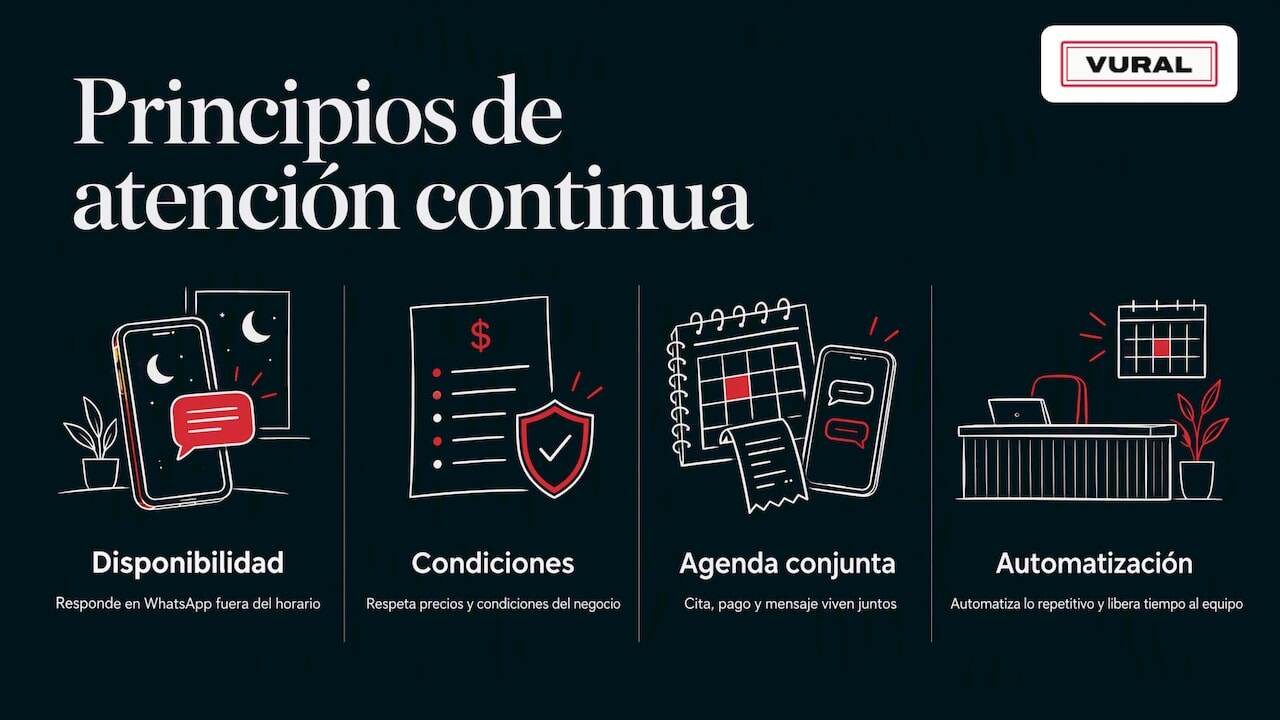
That's why we designed the assistant to reply on WhatsApp in real time, even outside working hours, and to always respect the terms and prices each business sets. We also believe the diary and the conversation should live together: when an appointment, a payment and a message sit in different places, slots and time get lost. And we don't charge a commission per appointment or tie you into a contract, because we think each business's revenue belongs to it.
Nor do we believe in an assistant that does everything. We'd rather it automated the repetitive work so your team has more time for what matters: looking after whoever is in the chair, on the treatment table or in the consulting room.
How Vural does it
Vural is an AI virtual assistant for service businesses that work by appointment: hair salons, beauty salons, physiotherapy practices and dental clinics. It answers your customers on WhatsApp, handles bookings, changes and cancellations, keeps a record card for each customer (past appointments, notes and preferences) and connects to Google Calendar. On the Pro plan it offers cancelled slots to the waiting list and prepares the business report; the weekly summary and taking a deposit with Stripe at booking are on both plans.
There are two monthly plans:
Plan Price Solo €49/month Pro €69/monthPrices exclude VAT. On top of that there's the setup, a one-off fixed price depending on the plan: €299 on Solo and €499 on Pro (more than 10 professionals or several locations, on quote). If the included AI conversations run out (100 on Solo, 250 on Pro), the assistant keeps replying and you can add packs of 100 conversations for €19. We set it all up with your business's details and the monthly fee only starts once it's working, with no minimum contract and no commission per appointment. See the details on the Vural plans page. To find out what happens with the fee, cancelling and your data, read the terms of service. And if you want to fine-tune what happens when you close, read the guide to the WhatsApp away message.
How to get started without overcomplicating it
You don't need to change everything on day one. A sensible path:
- Write down your 10 most frequent questions on WhatsApp and their answers.
- Set your terms: prices, duration, cancellation policy, deposit.
- Decide which cases a person should handle and how you'll be alerted.
- Switch the assistant on and test it yourself with messages at night.
- Review the conversations during the first few weeks and adjust.
- Tell your customers that they can book on WhatsApp at any time.
If you'd like more ideas, the Vural blog has resources for every kind of appointment-based business.
Frequently asked questions
Do I need to be online at night to offer 24/7 service?
No. The assistant replies and manages appointments for you while you sleep. You're only alerted to the cases that need a person. What matters is having set out your terms clearly and what gets handed over.
Can I just use the WhatsApp Business away message?
You can, and it's a good first step to let people know your opening hours. But it only informs: the customer can't get an appointment until you're back. If your goal is not to lose bookings after hours, you need something that replies and books.
Will the customer know they're talking to an AI?
It's best to be transparent and always offer a way to speak to a person. That avoids misunderstandings and builds trust. A friendly tone suited to your business doesn't have to hide that it's an assistant.
Can I send promotions on the same channel?
It depends. The AEPD allows commercial communications without prior consent in specific cases, such as a prior contractual relationship and similar services, and always with an easy, free way to unsubscribe. If in doubt, ask for explicit consent.
How much does 24/7 AI service on WhatsApp cost?
With Vural there are two plans: €49/month (Solo) and €69/month (Pro), excluding VAT, plus a one-off fixed-price setup depending on the plan: €299 or €499. We don't charge a commission per appointment and there's no minimum contract. The monthly fee starts once it's working.
Sources
Recommendations
More articles

1 November 2026
How to ask your customers for reviews on WhatsApp in 2026
Learn how to ask for Google reviews on WhatsApp: when to send the request, how to get the link, templates for each type of business and what Spanish law says.

31 October 2026
How to avoid overbooking in your appointment diary
Why appointments get double-booked in hair salons, beauty salons and physio practices and how to stop it: one calendar, confirmations and a waiting list.