Patient care over WhatsApp: a practical guide
23 October 2026

If you run a physiotherapy, dental or aesthetics clinic, your patients are already messaging you on WhatsApp. The question is how to look after them without your phone eating up your day. The short answer: use WhatsApp for admin (appointments, changes, reminders, common questions), keep clinical matters for the consultation and run the channel with clear privacy rules.
In this guide we explain what is worth handling over WhatsApp, what isn't, how to comply with data protection and how to automate patient care without it feeling cold.
In short
- WhatsApp works very well for appointments, changes, reminders and basic questions. It's not the place for diagnoses or detailed clinical data.
- Health data is a special category under the GDPR. If the chat is limited to managing the appointment, the risk drops considerably.
- Replying out of hours is where most appointments are won or lost. An AI assistant can fill that gap.
- Set down in writing what gets answered, who reviews it and what happens when a patient raises something clinical.
- No strings attached: with Vural there's no minimum term and the fee starts once it's working.
Contents
- Why patients prefer to message you on WhatsApp
- What you should and shouldn't handle over WhatsApp
- WhatsApp and data protection in a clinic
- The big blind spot: out-of-hours messages
- How to set up patient care over WhatsApp step by step
- A sample day at a physiotherapy clinic
- Automating with AI without losing the human touch
- Payments, deposits and lapsed patients
- How Vural handles it
- Our view: the channel is the least of your problems
- Common mistakes when looking after patients over WhatsApp
- Frequently asked questions
- Sources
Why patients prefer to message you on WhatsApp
Phoning requires the clinic to be open and someone to pick up. Messaging doesn't. A patient sends you a message on the way home from work, on the bus or at eleven at night, and expects a simple answer: “have you got a slot on Thursday?”.
For you, this has two sides:
- Upside: the patient books as soon as they think of it. A message answered in time is a confirmed appointment.
- Downside: if nobody replies until the next morning, some of those patients will already have messaged another clinic.
On top of that, the reception phone fills up with a jumble of messages: time changes, price questions, attendance certificates, questions about a session. Without a method, the chat turns into a second, messy diary.
What you should and shouldn't handle over WhatsApp
The WHO states that instant messaging can complement face-to-face care, but not replace it. That idea is a good way to organise the channel.
What fits
- Booking, changing and cancelling appointments.
- Confirmations and reminders.
- Questions about opening hours, location, session prices, payment methods or how to get there.
- Waiting-list alerts when a slot opens up.
- Sending the deposit or the payment for a session.
- A short follow-up question such as “how are you feeling after the session?”, without asking for clinical details over chat.
What doesn't fit
- Diagnoses or assessments of symptoms by message.
- Sending reports, test results or medical photos through an uncontrolled chat.
- Any emergency. If the patient describes something that seems urgent, the reply should direct them to phone the clinic or the emergency services.
An example from physiotherapy. A patient writes: “My knee has been hurting more since yesterday, can I come in today?”. The message has an admin part (coming in today) and a clinical part (getting worse). The sensible approach is to offer a slot or a call from the practitioner and not to start assessing the pain in writing. We have a guide to automating physiotherapy appointments with AI and WhatsApp with more cases like this one.
WhatsApp and data protection in a clinic
This is where many clinics hesitate, and rightly so. A clear summary:
- Health data is a special category. According to the AEPD (the Spanish data protection authority), processing it requires specific safeguards under Article 9 of the GDPR. Processing it without adequate technical measures can amount to a serious infringement.
- Managing appointments is not the same as handling medical records. In a decision on a conversational assistant, the AEPD distinguishes informational and administrative use from diagnostic telemedicine. If the system doesn't collect health data, the risk is much lower.
- The practitioner's personal phone is a weak spot. The WHO points out that using personal devices for care must not compromise the privacy or security of clinical information.
- Confidentiality applies to the chat too. The AEPD explains that it can step in when an organisation or a professional discloses customers' data in breach of confidentiality. In a clinic, the household-activity exemption for private individuals doesn't apply.
Practical rules for your clinic
- Use a business line, not each practitioner's personal phone.
- Avoid asking for symptoms, diagnoses or test results over chat. Ask only for what the appointment needs: name, service and time.
- Tell the patient, from the first message, that the assistant manages appointments and doesn't give medical advice or replace the consultation. That's the practice set out in the AEPD decision cited above.
- If you're going to send marketing messages, you need consent. The GDPR requires a clear affirmative act that is freely given, specific and informed.
- Have a written plan for security breaches: who finds out, who notifies and how it's put right.
- Sign the data processing terms with your provider and check where the data is stored.
If you want to go deeper, we've covered the topic in WhatsApp and GDPR: how to comply without losing bookings. This is general guidance. For your specific case, consult your data protection officer or a legal adviser specialising in healthcare.
The big blind spot: out-of-hours messages
Think about when people write. After 8pm, at the weekend, over lunch. Exactly when your reception is closed or busy with a patient.
This is the typical picture at a clinic with no automatic reply:
Moment What happens with no system What happens with an instant reply 22:30, Tuesday The message waits until the morning The patient picks a slot and it's booked Saturday afternoon Nobody replies until Monday Monday's first appointment is confirmed Last-minute cancellation The slot stays empty The waiting list is notified Price question The patient messages another clinic They get the price you've setYou'll find more ideas in the article on the WhatsApp away message. The idea is simple: patients shouldn't have to wait for you to open to sort out something as simple as a time.
How to set up patient care over WhatsApp step by step
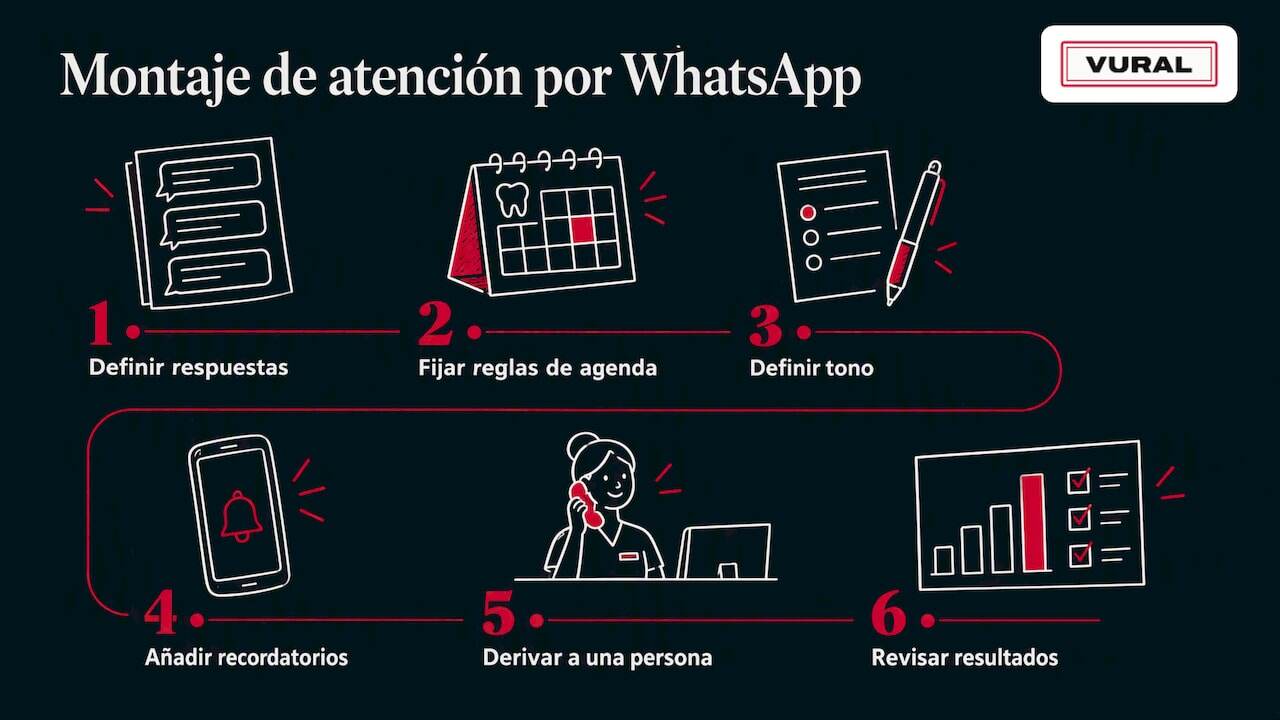
1. Decide what gets answered
List the ten questions you get most. They're usually opening hours, prices, location, parking, payment methods, session length and cancellation policy. Write the official answer to each.
2. Set the diary rules
Length of each service, practitioners, breaks, minimum notice to cancel, whether you ask for a deposit. The clearer they are, the fewer manual exceptions you'll have.
3. Define the tone
A dental clinic doesn't talk like a hair salon. Decide how informal you are, which words you use and how you say hello. Patients should feel that your clinic is writing to them, not a generic robot.
4. Add reminders and confirmations
A timely reminder cuts no-shows. We have templates in appointment confirmation messages and a summary of when to send them in the practical guide to WhatsApp appointment reminders. If you want the full method, see WhatsApp appointments: the practical guide to cutting no-shows.
5. Prepare the handover to a person
Anything the assistant shouldn't deal with (a complaint, a symptom, a clinical question) goes to someone on your team. Decide who sees it and how quickly.
6. Review the results
Check each week how many appointments came in out of hours, how many were cancelled and how many slots were recovered. Without numbers, it's hard to know whether the channel is working.
A sample day at a physiotherapy clinic
This is an illustrative scenario, not a real customer case:
- 08:15. A patient wrote last night to move their Wednesday appointment. The assistant has already offered three slots and they picked one.
- 11:40. A patient cancels for this afternoon. The assistant lets the person on the waiting list know and the slot is filled.
- 14:00. Someone asks whether you do pelvic floor sessions. The assistant answers with what you've set and suggests an assessment appointment.
- 19:30. A patient writes that their pain has got worse. The assistant doesn't assess the symptom: it alerts the team and suggests the clinic calls them.
- 23:10. Someone asks for a first visit. It's booked before they switch off their phone.
Reception hasn't been glued to the phone, and the cases that need professional judgement have reached a person.
Automating with AI without losing the human touch
The usual worry is that the patient will notice they're talking to a machine. Three decisions solve it:
- Transparency. Say from the start that it's the clinic's virtual assistant.
- Clear limits. Let it handle appointments and basic enquiries, not medical advice. Digital health experts insist that these tools should complement processes and not replace them.
- Your voice. The assistant should use your vocabulary and stick to your prices and terms.
The WHO highlights digital reminders as an intervention already showing positive effects in some settings, such as attendance at antenatal check-ups and vaccinations. It's not proof of results at your clinic, but it points the same way: a timely reminder helps.
Payments, deposits and lapsed patients
Two topics that tend to come in through the same chat:
- A deposit to book. Asking for one cuts no-shows for long or high-demand services. You'll find criteria in the article on advance payment for appointments and the payment method in taking payments over WhatsApp.
- Patients who don't come back. A friendly message to someone who hasn't been in for months wins back more than you'd think. If you do it as marketing, remember consent. There are templates in reactivating inactive customers.
How Vural handles it
Vural is an AI virtual assistant for appointment-based businesses, including physiotherapy and dental clinics. It answers on WhatsApp in real time, out of hours too, and handles bookings, changes and cancellations. It also:
- Keeps a record card for each customer (past appointments, notes and preferences) and adapts its tone and vocabulary to your business.
- On the Pro and Premium plans, offers cancelled slots to whoever is on the waiting list.
- On the Premium plan, takes the booking deposit with Stripe when the appointment is made, for the services you choose. It doesn't charge for the service itself.
- Connects to Google Calendar.
- On the Pro and Premium plans, prepares the weekly summary and the business report.
- Charges no commission per appointment and has no minimum term.
There are four plans:
Plan Fee Inicial €79 a month Esencial €199 a month Pro €399 a month Premium €999 a monthPrices exclude VAT. On top of that there's setup, a one-off payment at a fixed price depending on the plan: €480 on Inicial, €900 on Esencial, €1,200 on Pro and from €1,800 on Premium. If you need more AI conversations, there are packs of 250 conversations for €99. We set it up with your data, the fee starts once it's working and you can see how Vural fits your business. The fee, cancellation and data terms are in the terms of service.
Our view: the channel is the least of your problems
In appointment-based businesses the same sequence often repeats itself. A business starts getting appointments over WhatsApp, it goes well, and over time the chat becomes unmanageable. The temptation is to think one more tool is missing. Almost always, what's missing is order.
Our position comes down to three ideas:
- Rules first, technology second. If you don't know what you answer, how long each service takes or when you charge a deposit, no AI will fix it. Once the rules are set, automating is easy.
- A single diary. When one diary is in a notebook, another in the calendar and another in the chat, double bookings appear. That's why we bring the diary and the conversation together.
- AI does the repetitive work, people do the delicate work. We think it's sensible for the assistant to stick to appointments and basic questions, with the prices and terms you set. Clinical matters belong to your team.
Something worth taking care over is not promising more than the channel can deliver. WhatsApp doesn't replace the consultation. It does stop a patient going without a reply at ten at night.
Common mistakes when looking after patients over WhatsApp
- Mixing personal and work phones. It complicates privacy and handover when someone is on holiday.
- Asking for symptoms over chat. It's health information you don't need to book an appointment.
- Not offering an alternative. If there's no slot, offer two or three options and the waiting list.
- Replying late. A reply after 48 hours hardly ever turns into an appointment.
- Forgetting the cancellation policy. If it isn't written down, every case gets negotiated.
- Not measuring. Without data on no-shows and recovered slots you won't know whether you're improving.
Frequently asked questions
Can I look after my patients over WhatsApp under the GDPR?
Yes, if you do it carefully. Health data is a special category, so it's best to limit the chat to admin, use a business line and have safeguards in place with your provider. Consult your data protection officer or an adviser specialising in healthcare about your case.
What can an AI assistant answer, and what not?
It can handle appointments, changes, cancellations and basic questions such as opening hours, prices or location. It mustn't diagnose or assess symptoms. When a patient raises something clinical, it should pass the conversation to someone on your team.
Is the free WhatsApp Business app enough, or do I need something more?
With low volumes, replying by hand may be enough. When lots of messages come in, several people are involved or you want to reply out of hours, you need a system that connects WhatsApp to your diary. That prevents double bookings and unanswered messages.
How much does it cost to automate patient care over WhatsApp with Vural?
There are four plans: €79 a month (Inicial), €199 a month (Esencial), €399 a month (Pro) and €999 a month (Premium), excluding VAT, plus a one-off setup at a fixed price depending on the plan: €480, €900, €1,200 and from €1,800. We charge no commission per appointment and there's no minimum term. The fee starts once it's working.
Do patients accept talking to a virtual assistant?
They tend to accept it when it's explained from the start that it's the clinic's assistant and that it sorts out practical matters quickly. What annoys people is getting no reply, or an assistant pretending to be a person. Be transparent and always offer a way to talk to someone.
Sources
- AEPD: Your rights regarding your health data
- AEPD: decision E-03346-2020
- AEPD: disclosure of data through messaging services
- WHO: Consolidated telemedicine implementation guide
- WHO: Implementing telemedicine services during COVID-19
- WHO: first guideline on digital health interventions
- General Data Protection Regulation (Official Journal of the EU)
Recommendations
More articles

24 October 2026
How to manage the treatment rooms in your beauty salon
A practical guide to organising treatment rooms, cleaning times, packages and WhatsApp bookings in your beauty salon, without double bookings or lost slots.

22 October 2026
How to connect WhatsApp and Google Calendar for bookings
How to connect WhatsApp and Google Calendar in an appointment business: what is possible, the options, what to watch with data and when to automate it all.